
Writing raw sockets on an ESP32 is cleaner on day one. It is genuinely simpler, genuinely faster to get moving, and for a single microcontroller driving a handful of servos it is often the correct engineering decision.
ROS 2 is not a plug-and-play convenience layer. It is distributed middleware built to solve problems you do not have yet — time-synchronizing asynchronous nodes, standardizing message types across C++ and Python, managing coordinate transform trees that nest six levels deep. Adopting it before you have those problems is pure overhead.
The question is when you cross over. For this project, the crossing point was concrete: the moment a second consumer needed the same hand data. One script drawing on a frame is trivial. One script producing angles, another rendering a kinematic tree, a third logging telemetry, all needing the same data at the same instant without knowing about each other — that is when the framework starts paying rent.
Topics, and what DDS is doing underneath #
A ROS topic is an anonymous publish-subscribe conduit. Publishers fire messages without knowing who listens. Subscribers listen to a name without knowing who produces. Neither side holds a reference to the other.
That anonymity is the entire value proposition. Adding the telemetry sniffer to this project required zero changes to the tracker — it simply subscribed to a topic that already existed.
Underneath, the Data Distribution Service handles routing and, critically, discovery: nodes find each other automatically over UDP multicast, with no broker, no registry and no configuration. This is elegant right up until you containerize, at which point it becomes the single most common way to break a ROS 2 stack. Part 6 covers that in detail.
What RViz actually is #
RViz is a visualizer, not a simulator. It is worth being blunt about this because the confusion costs people days.
It reads the robot’s blueprint from the /robot_description topic to learn what links and joints
exist. It listens to /tf to know where every link sits in space. It draws meshes accordingly. That
is all it does.
It calculates no forces, no mass, no gravity, no contact. It shows you what the robot currently believes about itself, which is exactly what you want when debugging kinematics, and exactly what you do not want when testing whether a grasp will hold.
| RViz | Gazebo | |
|---|---|---|
| Role | Displays what the robot thinks it is doing | Simulates a physical world |
| Physics | None — forward kinematics only | Full: gravity, friction, inertia, collision |
| Data flow | Listens passively to /tf, /joint_states |
Publishes simulated sensors, subscribes to commands |
| Cost | Light | Heavy |
| Use it when | Verifying that tracking angles match the twin | Testing whether the hand can hold a ball |
For this project RViz is the right tool and Gazebo is aspirational. The goal is confirming that a human gesture produces the correct mechanical pose — a question about transforms, not forces.
The corollary is that RViz breaks silently. If your URDF has an axis pointing the wrong way, a mis-parented link or a limit typo, you get no error. You get a hand that twists inside out, or a finger that does not move, and no log line explaining why. Budget days for your first URDF, not hours.
The minimum viable ROS 2 project #
Before the containers and the meshes, this is the irreducible skeleton — six steps from empty directory to running system.
1. A workspace. Code cannot live loose; colcon looks in src/.
mkdir -p ~/my_robot_ws/src && cd ~/my_robot_ws/src2. A package — the atomic unit of ROS 2 software.
ros2 pkg create --build-type ament_python my_first_package --dependencies rclpy3. A node — an independent executable doing one job.
import rclpy
from rclpy.node import Node
from std_msgs.msg import String

class MinimalPublisher(Node):
    def __init__(self):
        super().__init__('talker_node')
        self.publisher_ = self.create_publisher(String, 'chatter', 10)
        self.timer = self.create_timer(0.5, self.timer_callback)

    def timer_callback(self):
        msg = String()
        msg.data = 'Hello ROS 2 Infrastructure!'
        self.publisher_.publish(msg)
        self.get_logger().info(f'Publishing: "{msg.data}"')
4. Expose it in setup.py, or ros2 run will not find it:
entry_points={
    'console_scripts': ['talker = my_first_package.talker_node:main'],
},
5. Build, from the workspace root:
colcon build --packages-select my_first_package6. Source, then run. This is the step everyone forgets, and the error message is unhelpful:
source install/setup.bash
ros2 run my_first_package talker
Then inspect what you built — ros2 topic list, ros2 topic echo /chatter,
ros2 node info /talker_node. Every advanced robot application is this skeleton repeated.
This project’s actual graph #
flowchart TB
    CAM["📷 /dev/video0"] --> HT["hand_tracker_node
10 Hz timer
container: hand_tracker"]
    HT -->|"/hand/joint_angles
hand_msgs/JointAngles
float32[15] · RAW radians"| SNIFF["sniffer_node
container: topic_sniffer
prints to stdout"]
    HT -->|"/joint_states
sensor_msgs/JointState
15 named · URDF radians"| RSP["robot_state_publisher
container: ros_rviz"]
    RSP -->|"/tf · /tf_static"| RVIZ["🖥️ rviz2"]
    RSP -->|"/robot_description"| RVIZ
    URDF["robot.urdf"] --> RSP
Three containers, all on ROS_DOMAIN_ID=42, all on host networking. A fourth service,
gazebo_sim, is defined in the compose file but currently commented out — it does not take part in
the graph above.
Two topics, because one would hide faults #
| Topic | Type | Contents | Consumer |
|---|---|---|---|
/hand/joint_angles |
hand_msgs/JointAngles |
float32[15], raw dot-product output, ~1.6–3.1 rad |
topic_sniffer |
/joint_states |
sensor_msgs/JointState |
15 named joints, already mapped to URDF limits | robot_state_publisher |
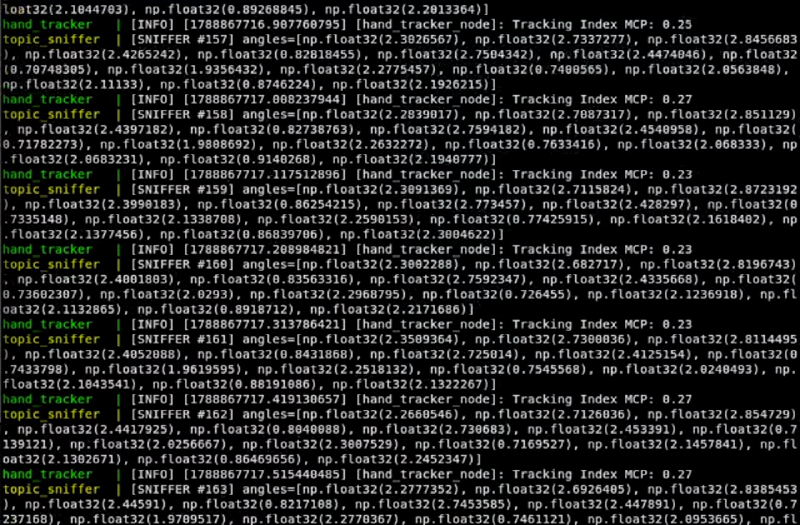
The first is unprocessed measurement; the second is the command signal. Publishing both costs almost nothing and buys immediate fault localization: if the model moves wrongly, compare the streams. Bad raw angles mean the vision layer. Good raw angles with bad mapped ones mean the table.
The joint_state_publisher that isn’t there #
Standard URDF demos run three nodes: joint_state_publisher invents positions from GUI sliders,
robot_state_publisher turns them into transforms, rviz2 draws them.
This project deletes the first one. The tracker is the joint state publisher — it publishes
/joint_states itself, at 10 Hz, from live camera data. Running both would put two publishers on
one topic and the model would flicker between your hand and whatever the sliders last held.
Which is why the compose service overrides the image’s default command:
command: >
  bash -c "
    source /opt/ros/jazzy/setup.bash &&
    ros2 run robot_state_publisher robot_state_publisher /workspace/ros_rviz/urdf/robot.urdf &
    exec rviz2 -d /workspace/ros_rviz/config.rviz
  "
A custom message, and why it is duplicated #
# hand_msgs/msg/JointAngles.msg
float32[15] angles
A fixed-size array rather than an unbounded float32[], so the ABI is stable and a malformed
message cannot silently resize. It is built with ament_cmake rather than ament_python, because
message generation needs the C++ toolchain even when every consumer is Python.
The package exists in two copies — one under hand_tracker/src/, one under topic_sniffer/src/
— and each container compiles its own at startup. They are byte-identical, and they must stay that
way: DDS matches publishers to subscribers by type hash, so a field added to one copy and not the
other produces no error at all. Just a subscriber that never fires.
10 Hz, not 30 #
self.timer = self.create_timer(1.0 / 10.0, self.timer_callback)The camera delivers ~30 FPS and MediaPipe keeps up on CPU, but the ROS side runs at 10 Hz. The callback does frame grab, inference, mapping and both publishes synchronously, so one full pipeline pass per tick is the real ceiling. 10 Hz is smooth enough for a visual twin and leaves CPU headroom for RViz rendering on the same machine.
Raising it means moving the capture off the callback thread, so a slow frame read cannot stall the publisher.
The fallback pose #
When MediaPipe finds no hand, the node does not skip publishing. It publishes a synthetic open hand:
msg.angles = [RAW_STRAIGHT_ANGLE] * 15All fifteen raw angles set to 3.10, which maps every joint to its open limit. The twin springs back
to a flat palm the instant tracking is lost, rather than freezing mid-gesture. In the sniffer output
this is unmistakable — a wall of np.float32(3.1) means “no hand in frame”, not “hand held
perfectly straight”.
Whether that is correct depends on where the joint states are going. For a visualizer it is pleasant. For real servos, snapping to open on a dropped frame is a safety problem, and hold-last-pose with a timeout would be the conservative choice.
Inspecting a running graph #
Everything is on domain 42 over host networking, so a throwaway container can see the whole thing:
docker run --rm -it --network host -e ROS_DOMAIN_ID=42 ros:jazzy \
bash -c "source /opt/ros/jazzy/setup.bash && ros2 topic list"| Command | Answers |
|---|---|
ros2 topic hz /joint_states |
Is the tracker really publishing at 10 Hz, or stalling on frame reads? |
ros2 topic echo /joint_states --once |
Are the joint names right? |
ros2 run tf2_tools view_frames |
Is the TF tree complete from base_link to every fingertip? |
docker compose logs -f topic_sniffer |
Raw angles — the vision layer in isolation |
The name check catches the most expensive class of bug in this whole stack. robot_state_publisher
silently drops JointState entries naming joints that do not exist in the URDF. One finger frozen
while four work is a string mismatch, essentially every time.
What you should take away #
- Adopt the middleware when you get a second consumer, not before. Anonymity between publisher and subscriber is the thing you are actually buying.
- RViz shows belief, Gazebo shows physics. Confusing them wastes days.
- RViz fails silently. No errors for wrong axes, wrong parents, or misspelled joints.
- Publish raw telemetry alongside processed output. It converts “something is wrong” into “the fault is in this layer” for almost no cost.
Next: where the URDF came from in the first place.
→ Part 5: From an Onshape assembly to a robot ROS 2 can reason about