
  1. Projects/
  2. Tendon-Driven Robotic Hand — A Vision-Teleoperated MuJoCo Digital Twin/

GUI, webcam and GPU passthrough for ROS 2 and MuJoCo containers

Mulham Fetna
Author
Mulham Fetna
Renaissance Engineer
Table of Contents
ROS 2 Tendon-Driven Hand MuJoCo Twin - This article is part of a series.
Part 18: This Article
Containers are headless by design. This project needs two windows, a webcam and a GPU — so the Compose file spends most of its lines punching carefully chosen holes back through the isolation.
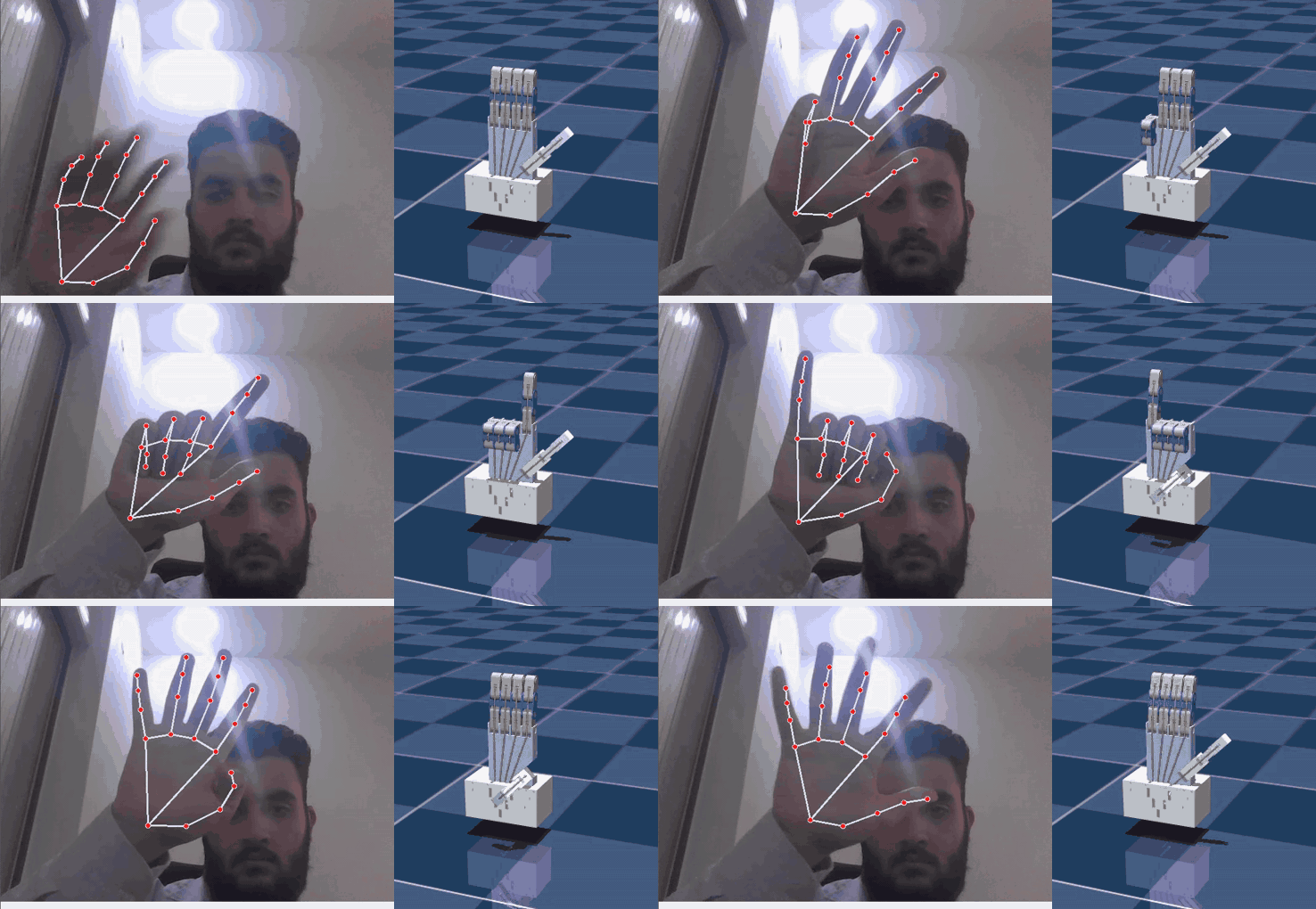
Both GUI windows from two containers running together on one display
Two containers, two windows, one X display: the Qt/OpenCV tracker (vision_tracker) and the GLFW MuJoCo viewer (mujoco_twin), recorded on Wayland through XWayland.

Windows: pass the X11 socket through
#

environment:
  DISPLAY: ${DISPLAY:-:0}
  QT_X11_NO_MITSHM: 1
volumes:
  - /tmp/.X11-unix:/tmp/.X11-unix:rw
Piece What it does
/tmp/.X11-unix mount the X server listens on a Unix socket here (X0 for :0); mounting it gives the container a line to it
DISPLAY tells X clients (GLFW, Qt) which display to use; defaults to :0
QT_X11_NO_MITSHM=1 stops Qt — OpenCV’s imshow backend — from using MIT-SHM, which fails across containers and gives blank or garbled windows
xhost +local:root (in setup_host.sh) the X server refuses untrusted clients; this admits local root, which is who the containers run as

On Wayland
#

Wayland sessions (KDE Plasma, GNOME) still run XWayland on :0, and both windows open through it — the recording above was made exactly that way. Running MuJoCo natively on a Wayland host, GLFW may warn Wayland: The platform does not provide the window position; it’s harmless.

GPU: /dev/dri
#

devices:
  - /dev/dri:/dev/dri

/dev/dri holds the Direct Rendering Infrastructure nodes (card*, renderD*). With them, Mesa in the container renders on the real GPU; without them it falls back to CPU software rendering and the viewer crawls.

/dev/dri is all you need — Mesa drives the GPU from inside the container. This project was developed on Intel UHD Graphics (Comet Lake).
The proprietary driver isn’t reached through /dev/dri. Install the NVIDIA Container Toolkit, then add a GPU reservation (deploy.resources.reservations.devices with capabilities: [gpu], or runtime: nvidia) and NVIDIA_DRIVER_CAPABILITIES=all to the services.

MUJOCO_GL=glfw selects MuJoCo’s windowed backend, which the interactive viewer needs; egl and osmesa are for headless offscreen rendering.

MediaPipe gets /dev/dri too. On the development host, its log showed that even the CPU hand-tracking graph opens an EGL context on the GPU at startup (gl_context_egl.cc … Successfully initialized EGL … Mesa Intel(R) UHD Graphics) — which may matter for performance (Part 19).

Webcam: /dev/video0
#

devices:
  - /dev/video0:/dev/video0
environment:
  CAMERA_INDEX: 0
  • OpenCV’s V4L2 backend opens /dev/video<CAMERA_INDEX>. Verified inside the container: V4L2, 640×480, 30 fps, YUYV.
  • Many webcams expose two nodes — /dev/video0 for frames, /dev/video1 for metadata. Use the first.
  • Another camera: map it and match the index, e.g. /dev/video2 with CAMERA_INDEX: 2.
  • v4l-utils is in the image: docker compose exec vision_tracker v4l2-ctl --list-formats-ext.
  • One process per camera. Stop the standalone script and close browser tabs using the webcam first.

setup_host.sh
#

./setup_host.sh

It runs xhost +local:root (asking you to install x11-xserver-utils if xhost is missing), then checks that /dev/video0 and /dev/dri exist. xhost grants reset at logout — run it once per login.

privileged: true — and what it really means
#

privileged hands the containers every host device and almost every kernel capability. It’s there for convenience: hot-plugged cameras and GPU nodes just work. Combined with host network, IPC and PID, and xhost +local:root, these containers are effectively not sandboxed from the host. Fine on a trusted workstation running your own code; not fine anywhere else.

Hardening, in order of effort:

  1. Drop privileged: true — the explicit devices: already grant camera and GPU; add group_add: ["video", "render"] if permissions complain.
  2. Replace xhost +local:root with a per-container Xauthority cookie, or xhost +SI:localuser:$(id -un) and run as your user.
  3. Run as non-root (user: "${UID}:${GID}") with the same UID in both services, so Fast DDS shared memory keeps working.
  4. Narrow the ipc/pid sharing (Part 17).
Mulham Fetna
Author
Mulham Fetna
Renaissance Engineer
ROS 2 Tendon-Driven Hand MuJoCo Twin - This article is part of a series.
Part 18: This Article

Related

Run the tendon-driven hand digital twin in 10 minutes

Clone, run one setup script, run one Compose command — and a webcam window and a MuJoCo viewer open side by side, with a simulated hand that closes when you close yours. Here are four ways in, from the full stack down to the bare model. The goal of this article: both windows open, and the twin follows your hand. What you need # Requirement Check with Notes Linux desktop, X11 or XWayland echo $DISPLAY → :0 Wayland sessions work through XWayland Docker Engine + Compose v2 docker compose version Built with Docker 29.8 / Compose 5.5 A webcam ls /dev/video0 Close any other app using it GPU device nodes ls /dev/dri Intel/AMD out of the box; NVIDIA needs the container toolkit (Part 18) ~5 GB of disk images: vision 2.9 GB, twin 1.7 GB No ROS installation is needed on the host — ROS 2 Jazzy lives inside the containers. Four ways to run it # Docker Compose (full stack) Single Python script Twin only, no camera Model viewer git clone https://github.com/mulhamfetna/ros2-tendon-driven-hand-mujoco-digital-twin-vision-teleoperation.git cd ros2-tendon-driven-hand-mujoco-digital-twin-vision-teleoperation ./setup_host.sh # X11 access for the containers + camera/GPU checks (once per login) docker compose up --build # builds both images, starts vision_tracker and mujoco_twin Stop with Ctrl+C, then docker compose down to release the camera.

Troubleshooting and FAQ: MuJoCo, MediaPipe and ROS 2 in Docker

Every entry here was hit, or deliberately checked, while building this project. Error messages are quoted exactly so a search for the message lands on the fix. Camera and windows # RuntimeError: Failed to open camera at index 0 # Something else holds the webcam — the standalone script, a previous container, a browser tab. Run docker compose down and close video apps. A camera opens in one process at a time. The camera is another node. ls /dev/video*, then map that device and set CAMERA_INDEX (many webcams expose /dev/video0 for frames and /dev/video1 for metadata — use the first). The device isn’t mapped. Check with docker compose config | grep video. Windows don’t open — cannot connect to X server, could not connect to display # Run ./setup_host.sh (it runs xhost +local:root). The permission resets when you log out. Make sure echo $DISPLAY on the host prints :0, or export DISPLAY before docker compose up. On Wayland, confirm XWayland is running: ls /tmp/.X11-unix/ should list X0. Black, blank or garbled OpenCV window # QT_X11_NO_MITSHM=1 must reach the container. It’s in the shared Compose environment — if a service defines its own environment:, it must merge the shared anchor with <<: *ros-env rather than replace it (Part 16).

Docker Compose architecture for ROS 2: dependency-only images and mounted code

Both images hold dependencies and nothing else. The code and the robot model are mounted from your checkout at runtime — so an edit is a five-second restart, not a five-minute rebuild. The big picture # flowchart TB subgraph HOST["🐧 Linux host"] CAMDEV["/dev/video0"] GPU["/dev/dri · Intel iGPU"] X11["/tmp/.X11-unix XWayland :0"] SHM["/dev/shm Fast DDS segments"] NET["host network UDP multicast · domain 42"] REPO["repository checkout"] subgraph VT["🐳 vision_tracker · 2.9 GB image"] VN["vision_tracker_node.py mediapipe 0.10.14 · OpenCV"] end subgraph MT["🐳 mujoco_twin · 1.7 GB image"] MN["mujoco_twin_node.py mujoco 3.13.0 · GLFW"] end end CAMDEV --> VN GPU --> VN GPU --> MN X11 <--> VN X11 <--> MN VN <--> SHM <--> MN VN <--> NET <--> MN REPO -. "bind mount .:/workspace:ro" .-> VN REPO -. "bind mount .:/workspace:ro" .-> MN Repository layout # . ├── docker-compose.yml # both services, shared namespaces ├── setup_host.sh # xhost + device checks, once per login ├── vision_tracker/ │ ├── Dockerfile # ros:jazzy + mediapipe==0.10.14 │ ├── .dockerignore # src/ is mounted, so keep it out of the build context │ └── src/vision_tracker_node.py ├── mujoco_twin/ │ ├── Dockerfile # ros:jazzy + mujoco==3.13.0 │ ├── .dockerignore # src/ and model/ are mounted │ ├── src/mujoco_twin_node.py │ └── model/ # scene.xml → robot.xml (+ tendons.xml), assets/, config.json ├── standalone/main.py # the same pipeline, one process └── docs/ Each service folder is its own build context: editing the vision Dockerfile never invalidates the twin’s image cache, and neither build uploads the 13 MB of meshes it doesn’t need.

How a webcam moves a simulated tendon-driven hand

One vision container turns webcam frames into five numbers. One simulation container turns those numbers into tendon forces. Everything else in this series is detail inside one of those two boxes — or the pipe between them. Left to right, three layers in one frame: vision (landmarks), simulation (the twin), actuation (live motor forces from MuJoCo’s Control panel). End to end # flowchart LR subgraph VISION["🐳 vision_tracker container"] direction TB A["Webcam frame 640×480 BGR"] --> B["MediaPipe Hands 21 landmarks"] B --> C["3 knuckle angles / finger dot product"] C --> D["mean → 1 curl angle (underactuation)"] D --> E["normalize + clip flexion 0..1"] end subgraph TWIN["🐳 mujoco_twin container"] direction TB F["lerp +50 N … −50 N"] --> G["data.ctrl on pull_{finger} motor"] G --> H["spatial tendon through 6 sites"] H --> I["3 passive hinge joints curl"] I --> J["MuJoCo viewer"] end E -- "ROS 2 · /hand/target_flexions sensor_msgs/JointState" --> F Stage What comes out Deep dive MediaPipe Hands 21 (x, y, z) landmarks per frame Part 4 Triplet angles 3 interior angles per finger, in radians Part 5 Averaging 1 curl angle per finger Part 6 Normalization flexion 0..1 (the thumb has its own window) Parts 7–8 ROS 2 topic JointState: names are fingers, positions are flexions Part 15 Lerp force in newtons per tendon Part 10 Tendon physics joint angles Part 11 Why the pipe carries flexions, not angles or forces # The contract between the containers is five unitless numbers: 0.0 is an open finger, 1.0 is a closed one. That choice is the architecture.

ROS 2 across Docker containers: shared network, discovery and Fast DDS shared memory

“The topic shows up in ros2 topic list, but echo prints nothing” — the classic ROS-in-Docker symptom. Here’s why it happens, how two containers in this project share a network and a block of memory instead, and what that costs. How ROS 2 nodes find each other # ROS 2 has no master. Nodes discover each other through DDS — in Jazzy, eProsima Fast DDS by default — using the SPDP protocol: Each participant announces itself over UDP multicast (239.255.0.1) on ports derived from the domain ID \(d\): discovery multicast on \(7400 + 250d\), unicast on \(7410 + 250d + 2p\) for participant \(p\). For domain 42: UDP 17900 and 17910+. Peers exchange their topic endpoints; matching publishers and subscribers connect. Data flows over the best transport both support — shared memory when they share a host and /dev/shm, UDP otherwise. Why Docker’s default network breaks it # Compose attaches services to a bridge network — a private NATed subnet. Multicast isn’t reliably routed across it, and machines on your LAN can’t reach container IPs at all.