
  1. Projects/
  2. Tendon-Driven Robotic Hand — A Vision-Teleoperated MuJoCo Digital Twin/

The ROS 2 topic contract: one JointState topic, two nodes, and rclpy inside a render loop

Mulham Fetna
Author
Mulham Fetna
Renaissance Engineer
Table of Contents
ROS 2 Tendon-Driven Hand MuJoCo Twin - This article is part of a series.
Part 15: This Article
The whole ROS 2 layer is one topic carrying five numbers. The interesting decisions are what those numbers mean, which message type carries them, and how to run a ROS subscriber when a 3D viewer owns your main thread.

Why ROS 2 between vision and physics at all?
#

The single-process script works well. Splitting it across ROS 2 buys:

Benefit Concretely
Process isolation a MediaPipe crash doesn’t kill the simulator, and vice versa
Independent environments vision and physics get their own container, dependencies and restarts
Swappable endpoints replace the twin with a servo driver, or the tracker with a data glove
Free observability ros2 topic echo, hz, bag record on the live stream
Network transparency any machine on the LAN can subscribe

The costs — a bigger stack, DDS configuration, one more hop — are small next to 19–85 ms of inference (Part 19).

The node graph
#

flowchart LR
    subgraph C1["🐳 vision_tracker"]
        V["/vision_tracker_node
timer · 30 Hz"] end subgraph C2["🐳 mujoco_twin"] T["/mujoco_twin_node
spin_once in viewer loop"] end V -- "/hand/target_flexions
sensor_msgs/JointState · depth 10" --> T V -. "any LAN subscriber
ROS_DOMAIN_ID=42" .-> X["ros2 topic echo · rosbag
future servo driver"]
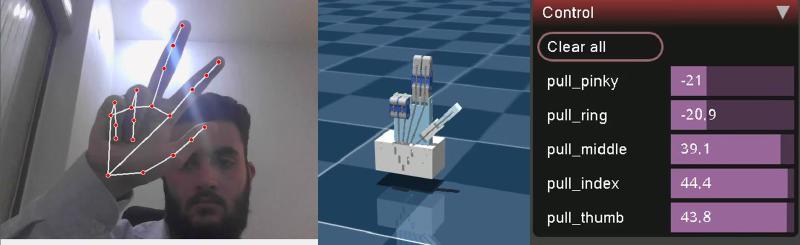
Peace sign live: the tracked hand, the twin, and the forces produced from the topic’s flexions
Every frame of the twin is driven by one JointState message like the one below.

The contract
#

Field Value
Topic /hand/target_flexions
Type sensor_msgs/msg/JointState
Publisher vision_tracker_node, timer at 30 Hz — effective rate bounded by inference
Subscriber mujoco_twin_node
QoS default reliable, keep-last 10
header.stamp publisher clock at publish time
name ["thumb", "index", "middle", "ring", "pinky"]
position flexion per finger, 0.0 open … 1.0 closed, same order as name
velocity, effort empty

A real message, captured with ros2 topic echo during testing (published by hand with ros2 topic pub, hence the zero stamp):

header:
  stamp: {sec: 0, nanosec: 0}
  frame_id: ''
name: [thumb, index, middle, ring, pinky]
position: [0.1, 0.2, 0.3, 0.4, 0.5]
velocity: []
effort: []

Why JointState — and why flexions, not radians
#

  • A stock message means no custom package — no colcon build, no rosidl step, no message definitions duplicated across containers, and every ROS tool already understands it.
  • position holds unitless flexions, not joint radians. The names are fingers, not model joints. That keeps the vision side ignorant of the robot’s joint structure.
  • Don’t remap it onto /joint_statesrobot_state_publisher would treat the values as radians for joints that don’t exist.
  • Names travel with values. The subscriber zips name and position, so order doesn’t matter and unknown names are ignored.

The publisher: timer-driven
#

class VisionTrackerNode(Node):
    def __init__(self):
        super().__init__("vision_tracker_node")
        self.tracker = HandTracker(CAMERA_INDEX)
        self.publisher = self.create_publisher(JointState, TOPIC, 10)
        self.timer = self.create_timer(PUBLISH_PERIOD, self.timer_callback)   # 1/30 s

    def timer_callback(self):
        ret, frame = self.tracker.cap.read()
        ...
        flexions, annotated_frame = self.tracker.get_finger_flexions(frame)
        msg = JointState()
        msg.header.stamp = self.get_clock().now().to_msg()
        msg.name = FINGERS
        msg.position = [flexions[f] for f in FINGERS]
        self.publisher.publish(msg)
        cv2.imshow("MediaPipe Hand Tracker", annotated_frame)
        if cv2.waitKey(1) & 0xFF == 27:
            raise KeyboardInterrupt     # ESC shuts the node down cleanly
  • Single-threaded executor. When a callback overruns its 33 ms period — as it does at ~85 ms with the viewer open — ticks don’t pile up into a backlog of stale frames.
  • The camera read lives in the callback. Simple and correct at this rate; production would grab frames on a thread and always process the newest.
  • Knobs: CAMERA_INDEX (default 0) and VISION_RATE_HZ (default 30), set from Compose.

The subscriber: pumped from inside a render loop
#

def main():
    rclpy.init()
    sim = DigitalTwin(SCENE_XML)
    node = MujocoTwinNode(sim)
    with mujoco.viewer.launch_passive(sim.model, sim.data) as viewer:
        start_time = time.time()
        while viewer.is_running() and rclpy.ok():
            rclpy.spin_once(node, timeout_sec=sim.model.opt.timestep)   # wait ≤ 2 ms for a message
            sim.step_physics(start_time)                                 # catch physics up to wall clock
            viewer.sync()
Why not rclpy.spin(node)? The passive viewer’s loop needs the main thread, and spin() would block it forever. So ROS is pumped from inside the render loop, one spin_once per iteration.
  • timeout_sec = timestep. A zero timeout lets the loop spin as fast as Python allows; waiting up to one physics step (2 ms) when idle still reacts within ~2 ms. Even so, the main thread measured ~90% of one core, because every iteration also steps and syncs — capping the loop at display rate is a cheap improvement.
  • Real-time stepping. mj_step runs until data.time catches up with wall-clock time, so the simulation runs at 1× regardless of loop rate.
  • The callback only writes data.ctrl — no stepping, no rendering — so it takes microseconds.
  • The last command holds. If the publisher dies, the motors keep their last forces, and with the switch-like physics the hand freezes in its last pose. A watchdog is on the roadmap.

Observe it, poke it
#

From inside either container — or any LAN machine with ROS 2 Jazzy and ROS_DOMAIN_ID=42:

docker compose exec mujoco_twin bash
source /opt/ros/jazzy/setup.bash

ros2 node list                              # /vision_tracker_node  /mujoco_twin_node
ros2 topic info -v /hand/target_flexions    # endpoints and QoS
ros2 topic hz /hand/target_flexions         # 30.0 Hz alone · 10.7 Hz with the viewer open
ros2 topic echo /hand/target_flexions

# drive the twin with no camera: index and thumb closed
ros2 topic pub -r 10 /hand/target_flexions sensor_msgs/msg/JointState \
  "{name: [thumb, index, middle, ring, pinky], position: [1.0, 1.0, 0.0, 0.0, 0.0]}"

# record a session to replay into the twin later
ros2 bag record /hand/target_flexions

ros2 topic pub plus docker compose up mujoco_twin is the fastest way to develop the simulation side without a webcam.
Mulham Fetna
Author
Mulham Fetna
Renaissance Engineer
ROS 2 Tendon-Driven Hand MuJoCo Twin - This article is part of a series.
Part 15: This Article

Related

From finger flexion to tendon force: linear interpolation onto a MuJoCo motor

On the far side of the ROS 2 topic, five flexions arrive and five tendon motors wait. One line of linear interpolation connects them — plus a name lookup that can fail silently, and a string that is allowed to push. The formula # $$F(t) = F_\text{open} + t\,(F_\text{closed} - F_\text{open}) = 50 + t\,(-50 - 50) = 50 - 100\,t$$FORCE_OPEN = 50.0 FORCE_CLOSED = -50.0 def _lerp(self, start_val, end_val, t): return start_val + t * (end_val - start_val) def apply_flexions(self, flexions): for finger, flexion_amount in flexions.items(): target_force = self._lerp(FORCE_OPEN, FORCE_CLOSED, flexion_amount) self.data.ctrl[self.motors[finger]] = target_force Three parts of one line # With \(t = 0.75\), a finger 75% closed:

How a webcam moves a simulated tendon-driven hand

One vision container turns webcam frames into five numbers. One simulation container turns those numbers into tendon forces. Everything else in this series is detail inside one of those two boxes — or the pipe between them. Left to right, three layers in one frame: vision (landmarks), simulation (the twin), actuation (live motor forces from MuJoCo’s Control panel). End to end # flowchart LR subgraph VISION["🐳 vision_tracker container"] direction TB A["Webcam frame 640×480 BGR"] --> B["MediaPipe Hands 21 landmarks"] B --> C["3 knuckle angles / finger dot product"] C --> D["mean → 1 curl angle (underactuation)"] D --> E["normalize + clip flexion 0..1"] end subgraph TWIN["🐳 mujoco_twin container"] direction TB F["lerp +50 N … −50 N"] --> G["data.ctrl on pull_{finger} motor"] G --> H["spatial tendon through 6 sites"] H --> I["3 passive hinge joints curl"] I --> J["MuJoCo viewer"] end E -- "ROS 2 · /hand/target_flexions sensor_msgs/JointState" --> F Stage What comes out Deep dive MediaPipe Hands 21 (x, y, z) landmarks per frame Part 4 Triplet angles 3 interior angles per finger, in radians Part 5 Averaging 1 curl angle per finger Part 6 Normalization flexion 0..1 (the thumb has its own window) Parts 7–8 ROS 2 topic JointState: names are fingers, positions are flexions Part 15 Lerp force in newtons per tendon Part 10 Tendon physics joint angles Part 11 Why the pipe carries flexions, not angles or forces # The contract between the containers is five unitless numbers: 0.0 is an open finger, 1.0 is a closed one. That choice is the architecture.

Run the tendon-driven hand digital twin in 10 minutes

Clone, run one setup script, run one Compose command — and a webcam window and a MuJoCo viewer open side by side, with a simulated hand that closes when you close yours. Here are four ways in, from the full stack down to the bare model. The goal of this article: both windows open, and the twin follows your hand. What you need # Requirement Check with Notes Linux desktop, X11 or XWayland echo $DISPLAY → :0 Wayland sessions work through XWayland Docker Engine + Compose v2 docker compose version Built with Docker 29.8 / Compose 5.5 A webcam ls /dev/video0 Close any other app using it GPU device nodes ls /dev/dri Intel/AMD out of the box; NVIDIA needs the container toolkit (Part 18) ~5 GB of disk images: vision 2.9 GB, twin 1.7 GB No ROS installation is needed on the host — ROS 2 Jazzy lives inside the containers. Four ways to run it # Docker Compose (full stack) Single Python script Twin only, no camera Model viewer git clone https://github.com/mulhamfetna/ros2-tendon-driven-hand-mujoco-digital-twin-vision-teleoperation.git cd ros2-tendon-driven-hand-mujoco-digital-twin-vision-teleoperation ./setup_host.sh # X11 access for the containers + camera/GPU checks (once per login) docker compose up --build # builds both images, starts vision_tracker and mujoco_twin Stop with Ctrl+C, then docker compose down to release the camera.

Troubleshooting and FAQ: MuJoCo, MediaPipe and ROS 2 in Docker

Every entry here was hit, or deliberately checked, while building this project. Error messages are quoted exactly so a search for the message lands on the fix. Camera and windows # RuntimeError: Failed to open camera at index 0 # Something else holds the webcam — the standalone script, a previous container, a browser tab. Run docker compose down and close video apps. A camera opens in one process at a time. The camera is another node. ls /dev/video*, then map that device and set CAMERA_INDEX (many webcams expose /dev/video0 for frames and /dev/video1 for metadata — use the first). The device isn’t mapped. Check with docker compose config | grep video. Windows don’t open — cannot connect to X server, could not connect to display # Run ./setup_host.sh (it runs xhost +local:root). The permission resets when you log out. Make sure echo $DISPLAY on the host prints :0, or export DISPLAY before docker compose up. On Wayland, confirm XWayland is running: ls /tmp/.X11-unix/ should list X0. Black, blank or garbled OpenCV window # QT_X11_NO_MITSHM=1 must reach the container. It’s in the shared Compose environment — if a service defines its own environment:, it must merge the shared anchor with <<: *ros-env rather than replace it (Part 16).

Docker Compose architecture for ROS 2: dependency-only images and mounted code

Both images hold dependencies and nothing else. The code and the robot model are mounted from your checkout at runtime — so an edit is a five-second restart, not a five-minute rebuild. The big picture # flowchart TB subgraph HOST["🐧 Linux host"] CAMDEV["/dev/video0"] GPU["/dev/dri · Intel iGPU"] X11["/tmp/.X11-unix XWayland :0"] SHM["/dev/shm Fast DDS segments"] NET["host network UDP multicast · domain 42"] REPO["repository checkout"] subgraph VT["🐳 vision_tracker · 2.9 GB image"] VN["vision_tracker_node.py mediapipe 0.10.14 · OpenCV"] end subgraph MT["🐳 mujoco_twin · 1.7 GB image"] MN["mujoco_twin_node.py mujoco 3.13.0 · GLFW"] end end CAMDEV --> VN GPU --> VN GPU --> MN X11 <--> VN X11 <--> MN VN <--> SHM <--> MN VN <--> NET <--> MN REPO -. "bind mount .:/workspace:ro" .-> VN REPO -. "bind mount .:/workspace:ro" .-> MN Repository layout # . ├── docker-compose.yml # both services, shared namespaces ├── setup_host.sh # xhost + device checks, once per login ├── vision_tracker/ │ ├── Dockerfile # ros:jazzy + mediapipe==0.10.14 │ ├── .dockerignore # src/ is mounted, so keep it out of the build context │ └── src/vision_tracker_node.py ├── mujoco_twin/ │ ├── Dockerfile # ros:jazzy + mujoco==3.13.0 │ ├── .dockerignore # src/ and model/ are mounted │ ├── src/mujoco_twin_node.py │ └── model/ # scene.xml → robot.xml (+ tendons.xml), assets/, config.json ├── standalone/main.py # the same pipeline, one process └── docs/ Each service folder is its own build context: editing the vision Dockerfile never invalidates the twin’s image cache, and neither build uploads the 13 MB of meshes it doesn’t need.