One vision container turns webcam frames into five numbers. One simulation container turns those
numbers into tendon forces. Everything else in this series is detail inside one of those two boxes
— or the pipe between them.
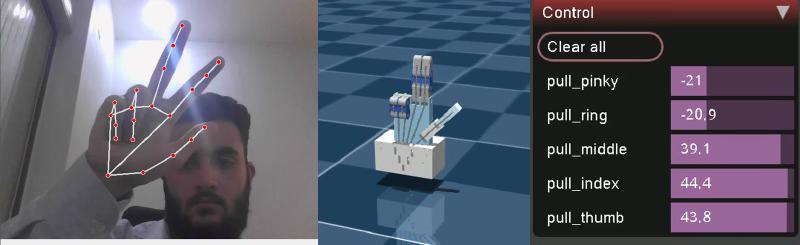
Left to right, three layers in one frame: vision (landmarks), simulation (the twin), actuation (live motor forces from MuJoCo’s Control panel).
Why the pipe carries flexions, not angles or forces
#
The contract between the containers is five unitless numbers: 0.0 is an open finger, 1.0 is a closed
one. That choice is the architecture.
The vision side never learns about the robot. It doesn’t know the hand has tendons, how strong
the motors are, or how the joints are signed. Recalibrate it, swap MediaPipe for a data glove — the
simulator doesn’t notice.
The robot side never learns about cameras. Change ±50 N to a position servo, or replace MuJoCo
with real SG90 servos — the tracker doesn’t notice.
Anyone can listen. A ros2 topic echo on another laptop, a rosbag recording, a future
hardware driver — all consume the same five numbers.
The twin is smooth on the vision side and binary on the physics side. Any flexion above about
0.51 closes a finger completely; anything below 0.5 pushes it open.
The proportional band is 0.50–0.51. Everything else is fully open or fully closed.
That is why the live demo looks crisp and why a half-closed hand can’t be mirrored yet — measured,
explained and fixed in simulation in Part 11.
Everything in this series in one read: how a $20 webcam ends up driving a 15-DOF CAD model in real time, why every step is deliberately explicit rather than learned, and what broke along the way. You hold your hand up to a laptop camera. On the other half of the screen, a robotic hand — designed in CAD, never manufactured — closes its fingers at the same moment yours do.
There is no glove, no marker, no depth sensor. Just an RGB webcam, two small neural networks, about forty lines of vector geometry, and a middleware stack that thinks it is talking to a real robot.
All of it is open source under AGPL-3.0 and archived with a DOI: 10.5281/zenodo.22658556.
flowchart LR A["📷 Webcam
/dev/video0"] --> B["BlazePalm
palm detector"] B --> C["Landmark regressor
21 × (x, y, z)"] C --> D["Dot-product geometry
15 interior angles"] D --> E["Normalize → flexion
0.0 straight · 1.0 curled"] E --> F["Lerp onto the URDF's
mechanical limits"] F --> G["/joint_states"] G --> H["robot_state_publisher
→ /tf"] H --> I["🖥️ RViz digital twin"] The rule that shaped the build # There is an easier version of this project. Collect a few thousand frames of a hand next to the corresponding CAD poses, train a network to map one to the other, and let gradient descent work out the relationship.
The system works, and it teaches well. Getting it to drive real servos safely is a sequence of well-scoped upgrades — each one grounded in a limitation measured earlier in this series. Where it stands # Area Today Production target Hand tracking image-normalized landmarks, one global calibration metric world landmarks, per-finger calibration, a temporal filter Command mapping flexion → ±50 N; the twin is a switch flexion → tendon length; proportional curl Physics model force motors, decorative horns, no self-contact position servos on horns, tuned stiffness, contacts for grasping Middleware one topic, default QoS, open on the LAN parameters, explicit QoS, a watchdog, SROS 2 Containers privileged, host namespaces, root, xhost least privilege, non-root, optional headless Code classes copied into three files, no tests one shared package, tests, CI Hardware simulation only a servo driver on the same topic Stage 1 · Correctness Measure the right thing, command the right quantity World landmarks. Image-normalized coordinates bend angles by up to 16° with hand orientation (Part 4). Read multi_hand_world_landmarks instead, then recalibrate.
Clone, run one setup script, run one Compose command — and a webcam window and a MuJoCo viewer open side by side, with a simulated hand that closes when you close yours. Here are four ways in, from the full stack down to the bare model. The goal of this article: both windows open, and the twin follows your hand. What you need # Requirement Check with Notes Linux desktop, X11 or XWayland echo $DISPLAY → :0 Wayland sessions work through XWayland Docker Engine + Compose v2 docker compose version Built with Docker 29.8 / Compose 5.5 A webcam ls /dev/video0 Close any other app using it GPU device nodes ls /dev/dri Intel/AMD out of the box; NVIDIA needs the container toolkit (Part 18) ~5 GB of disk images: vision 2.9 GB, twin 1.7 GB No ROS installation is needed on the host — ROS 2 Jazzy lives inside the containers.
Four ways to run it # Docker Compose (full stack) Single Python script Twin only, no camera Model viewer git clone https://github.com/mulhamfetna/ros2-tendon-driven-hand-mujoco-digital-twin-vision-teleoperation.git cd ros2-tendon-driven-hand-mujoco-digital-twin-vision-teleoperation ./setup_host.sh # X11 access for the containers + camera/GPU checks (once per login) docker compose up --build # builds both images, starts vision_tracker and mujoco_twin Stop with Ctrl+C, then docker compose down to release the camera.
The whole ROS 2 layer is one topic carrying five numbers. The interesting decisions are what those numbers mean, which message type carries them, and how to run a ROS subscriber when a 3D viewer owns your main thread. Why ROS 2 between vision and physics at all? # The single-process script works well. Splitting it across ROS 2 buys:
Benefit Concretely Process isolation a MediaPipe crash doesn’t kill the simulator, and vice versa Independent environments vision and physics get their own container, dependencies and restarts Swappable endpoints replace the twin with a servo driver, or the tracker with a data glove Free observability ros2 topic echo, hz, bag record on the live stream Network transparency any machine on the LAN can subscribe The costs — a bigger stack, DDS configuration, one more hop — are small next to 19–85 ms of inference (Part 19).
The node graph # flowchart LR subgraph C1["🐳 vision_tracker"] V["/vision_tracker_node
timer · 30 Hz"] end subgraph C2["🐳 mujoco_twin"] T["/mujoco_twin_node
spin_once in viewer loop"] end V -- "/hand/target_flexions
sensor_msgs/JointState · depth 10" --> T V -. "any LAN subscriber
ROS_DOMAIN_ID=42" .-> X["ros2 topic echo · rosbag
future servo driver"] Every frame of the twin is driven by one JointState message like the one below. The contract # Field Value Topic /hand/target_flexions Type sensor_msgs/msg/JointState Publisher vision_tracker_node, timer at 30 Hz — effective rate bounded by inference Subscriber mujoco_twin_node QoS default reliable, keep-last 10 header.stamp publisher clock at publish time name ["thumb", "index", "middle", "ring", "pinky"] position flexion per finger, 0.0 open … 1.0 closed, same order as name velocity, effort empty A real message, captured with ros2 topic echo during testing (published by hand with ros2 topic pub, hence the zero stamp):
Every entry here was hit, or deliberately checked, while building this project. Error messages are quoted exactly so a search for the message lands on the fix. Camera and windows # RuntimeError: Failed to open camera at index 0 # Something else holds the webcam — the standalone script, a previous container, a browser tab. Run docker compose down and close video apps. A camera opens in one process at a time. The camera is another node. ls /dev/video*, then map that device and set CAMERA_INDEX (many webcams expose /dev/video0 for frames and /dev/video1 for metadata — use the first). The device isn’t mapped. Check with docker compose config | grep video. Windows don’t open — cannot connect to X server, could not connect to display # Run ./setup_host.sh (it runs xhost +local:root). The permission resets when you log out. Make sure echo $DISPLAY on the host prints :0, or export DISPLAY before docker compose up. On Wayland, confirm XWayland is running: ls /tmp/.X11-unix/ should list X0. Black, blank or garbled OpenCV window # QT_X11_NO_MITSHM=1 must reach the container. It’s in the shared Compose environment — if a service defines its own environment:, it must merge the shared anchor with <<: *ros-env rather than replace it (Part 16).