
  1. Projects/
  2. Tendon-Driven Robotic Hand — A Vision-Teleoperated MuJoCo Digital Twin/

Why the thumb needs its own thresholds in hand tracking

Mulham Fetna
Author
Mulham Fetna
Renaissance Engineer
Table of Contents
ROS 2 Tendon-Driven Hand MuJoCo Twin - This article is part of a series.
Part 8: This Article
Squeeze your thumb across your palm as hard as you can and, by the finger thresholds, it is only half closed. The thumb isn’t a finger with a shorter bone — it’s a different joint.
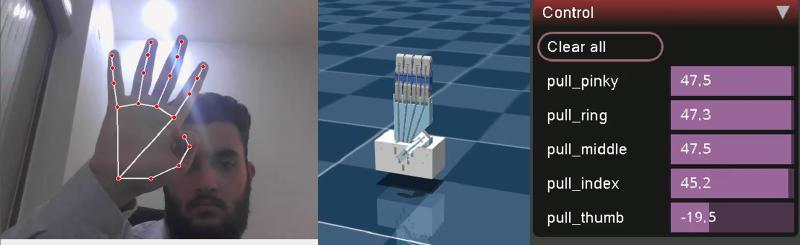
Live: thumb tucked across the palm, fingers open — only pull_thumb goes negative at −19.5 N
Thumb curled, fingers open. Only pull_thumb goes negative (−19.5 N, flexion 0.69); every other motor pushes open.

Hinges versus a saddle
#

  • Index to pinky are chains of hinge joints. A fist rolls them into a tight spiral, each knuckle approaching 90°.
  • The thumb hangs from the carpometacarpal (CMC) saddle joint at the wrist. It sweeps across the palm — opposition — instead of simply curling. Much of “closing the thumb” is rotation of the whole thumb, not bending at its knuckles.

What MediaPipe measures because of it
#

Interior angles come from 3D landmark positions, so the sweep only partly shows up as knuckle bend:

Open Fully closed Travel
Finger — mean of MCP/PIP/DIP ≈ 3.10 rad ≈ 1.60 rad 1.50 rad
Thumb — mean of CMC/MCP/IP ≈ 2.90 rad ≈ 2.30 rad 0.60 rad

A fully closed thumb stops near 2.30 rad (~132°). Even its open angle sits below a finger’s — a relaxed thumb is never in line with the wrist.

The failure the separate window fixes
#

With the finger window, a thumb squeezed as far as it goes gives:

$$\text{flexion} = \frac{3.10 - 2.30}{1.50} = 0.53 \quad\Rightarrow\quad F = 50 - 100 \times 0.53 \approx -3\ \text{N}$$

Fully closed thumb, half-closed command. With its own window:

$$\text{flexion} = \frac{2.90 - 2.30}{0.60} = 1.0 \quad\Rightarrow\quad F = -50\ \text{N}$$
if finger_name == "thumb":
    straight_limit = THUMB_STRAIGHT_ANGLE   # 2.90
    curled_limit = THUMB_CURLED_ANGLE       # 2.30
else:
    straight_limit = RAW_STRAIGHT_ANGLE     # 3.10
    curled_limit = RAW_CURLED_ANGLE         # 1.60

The trade-off: a narrow window is a twitchy window
#

The thumb covers 0 → 1 in 0.60 rad, so it is 2.5× more sensitive than the fingers (\(1.50 / 0.60\)). Landmark jitter that barely moves a finger visibly moves the thumb. If the thumb flickers:

  • widen its window slightly (e.g. 2.95 → 2.25), or
  • add temporal filtering — a One-Euro filter is on the production roadmap.

The robot thumb closes differently too
#

On the simulation side, the thumb doesn’t close like a finger either. At the full −50 N pull its CMC joint reaches ~92° but its MP and IP joints stop around 54° and 46°, while every index joint reaches ~94°.
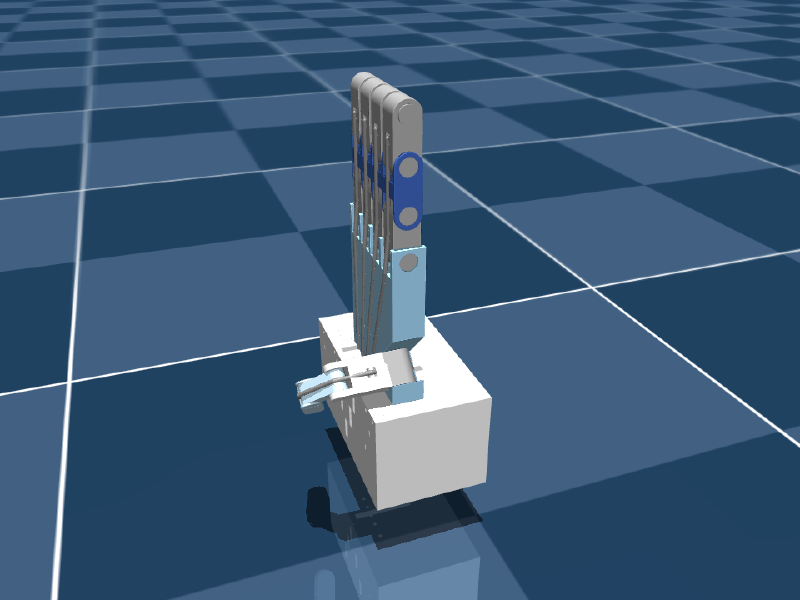
Only the thumb tendon pulled in simulation
The simulated thumb with only its own tendon pulled.

The likely cause is the thumb tendon’s routing geometry — once the CMC hits its stop, the path leaves little moment arm to curl the distal joints further — but it hasn’t been isolated yet. The vision thresholds and the robot’s joint distribution are independent problems; Part 11 covers the physics.
Mulham Fetna
Author
Mulham Fetna
Renaissance Engineer
ROS 2 Tendon-Driven Hand MuJoCo Twin - This article is part of a series.
Part 8: This Article

Related

Calibrating hand tracking to your own hand — with real data from a live session

The shipped thresholds were measured on one hand with one webcam. Here is how to measure yours — and what a live recording revealed about how far off “good enough” can be while the twin still looks perfect. Symptoms that call for calibration # What you see in the published flexions Cause Change A fist, but flexion stays below 1.0 your fist angle is above the curled limit raise *_CURLED_ANGLE to your fist reading Flexion hits 1.0 with the hand half closed curled limit too high lower *_CURLED_ANGLE Flexion above 0 with a relaxed open hand your open angle is below the straight limit lower *_STRAIGHT_ANGLE to your open reading The thumb flickers thumb window too narrow for your jitter widen it (Part 8) Calibrate against the numbers, not the render. With the current force-control tuning, the simulated finger snaps shut past flexion ≈ 0.51 (Part 11), so most calibration errors are invisible in the viewer. Watch ros2 topic echo /hand/target_flexions. Real data: what a live session produced # MuJoCo’s viewer has a Control panel showing the live force of every motor. Since the force is \(F = 50 - 100 \cdot \text{flexion}\), every recorded frame gives back the exact flexion the tracker published: flexion = (50 − F) / 100.

How a webcam moves a simulated tendon-driven hand

One vision container turns webcam frames into five numbers. One simulation container turns those numbers into tendon forces. Everything else in this series is detail inside one of those two boxes — or the pipe between them. Left to right, three layers in one frame: vision (landmarks), simulation (the twin), actuation (live motor forces from MuJoCo’s Control panel). End to end # flowchart LR subgraph VISION["🐳 vision_tracker container"] direction TB A["Webcam frame 640×480 BGR"] --> B["MediaPipe Hands 21 landmarks"] B --> C["3 knuckle angles / finger dot product"] C --> D["mean → 1 curl angle (underactuation)"] D --> E["normalize + clip flexion 0..1"] end subgraph TWIN["🐳 mujoco_twin container"] direction TB F["lerp +50 N … −50 N"] --> G["data.ctrl on pull_{finger} motor"] G --> H["spatial tendon through 6 sites"] H --> I["3 passive hinge joints curl"] I --> J["MuJoCo viewer"] end E -- "ROS 2 · /hand/target_flexions sensor_msgs/JointState" --> F Stage What comes out Deep dive MediaPipe Hands 21 (x, y, z) landmarks per frame Part 4 Triplet angles 3 interior angles per finger, in radians Part 5 Averaging 1 curl angle per finger Part 6 Normalization flexion 0..1 (the thumb has its own window) Parts 7–8 ROS 2 topic JointState: names are fingers, positions are flexions Part 15 Lerp force in newtons per tendon Part 10 Tendon physics joint angles Part 11 Why the pipe carries flexions, not angles or forces # The contract between the containers is five unitless numbers: 0.0 is an open finger, 1.0 is a closed one. That choice is the architecture.

MediaPipe Hands for robotics — and the 16° angle trap in normalized landmarks

Twenty-one points per frame, on a laptop CPU, from a flat RGB image. That is what MediaPipe hands to a robot. It is easy to treat as a black box — until you compute angles from it and discover the box stretched your coordinate space. Where MediaPipe sits # flowchart TB CAM["USB webcam 640×480 @ 30 fps · YUYV"] -->|"BGR frame"| RGB["cv2.cvtColor BGR → RGB"] RGB --> MP["MediaPipe Hands palm detector + landmark model"] MP -->|"21 × (x, y, z)"| ANG["Triplet angles Part 5"] ANG --> AVG["Average per finger Part 6"] AVG --> NORM["Flexion 0..1 Parts 7–8"] NORM -->|"/hand/target_flexions"| TWIN["MuJoCo twin"] The vision layer knows nothing about MuJoCo. Its entire output is five numbers between 0.0 (open) and 1.0 (closed). Two networks, not one # MediaPipe Hands is a cascade: BlazePalm, a single-shot detector, finds a palm bounding box in the full frame. Palms, not hands: a palm is close to a rigid square; a hand with moving fingers is not. A landmark model crops that region and regresses 21 keypoints, a hand-presence score and handedness. In video mode (static_image_mode=False) the detector barely runs. Landmarks from frame t define the crop for frame t+1, and the detector wakes only when tracking confidence drops. That shortcut is why this pipeline holds 30 fps on a CPU.

Underactuation: why three knuckle angles become one tendon command

avg_angle = np.mean(angles) looks like noise filtering. It isn’t. It is a mechanical decision: a human finger has three joints you can move separately, and this robot finger has one string. Not smoothing — compression # “Averaging” in a sensor pipeline usually means averaging over time to reduce noise. Nothing here keeps history between frames. The mean is taken across space — over the three joints of one finger in a single frame — to solve a problem called underactuation. The 3-to-1 problem # Human finger Robot finger Joints 3 (MCP, PIP, DIP) 3 hinges (*_mcp, *_pip, *_dip) Independent actuators many muscles; joints move semi-independently 1 flexor tendon, 1 motor Degrees of freedom you can command ~3 1 A system with fewer actuators than joints is underactuated. A single tendon threads all three joints of each robot finger, so the only command is “pull this string with force F” — and the joints share that pull according to routing geometry and dynamics. One string, six via-points, three joints. Pull it and all three knuckles move together. So the vision layer must compress three human measurements into one robot command.

How MediaPipe sees a hand — and exactly where it fails

Twenty-one points, thirty frames a second, on a CPU, from a flat RGB image with no depth information. This is how that is possible — and the four failure modes you will meet the first time you rely on it. Every vision-driven robotics project has a moment where the camera stops being a camera and starts being a sensor. For this one, that moment is MediaPipe Hands: a webcam frame goes in, and 21 numbered points in space come out. It is easy to treat that as a black box. It is also a mistake, because the box has a specific shape, and its failure modes follow directly from how it was built. It is two networks, not one # The single most useful thing to know about MediaPipe Hands is that it is a cascade: a detector and a regressor, with completely different jobs. flowchart TB A["📷 Full frame e.g. 640 × 480"] --> B["Stage 1 — BlazePalm SSD detector"] B --> C["Oriented palm crop 256 × 256"] C --> D["Stage 2 — Landmark regressor MobileNetV2-style encoder"] D --> E["63 floats 21 landmarks × (x, y, z)"] D --> F["Presence score"] D --> G["Handedness left / right"] F -->|"confidence ≥ 0.5"| C F -->|"confidence < 0.5"| B The regressor’s output, drawn back onto the frame: 21 points and the connections between them. Stage 1 — BlazePalm detects palms, never fingers # This is the design decision the whole system rests on.