
  1. Projects/
  2. Tendon-Driven Robotic Hand — A Vision-Teleoperated MuJoCo Digital Twin/

From tutorial project to production robot: a roadmap for the tendon hand twin

Mulham Fetna
Author
Mulham Fetna
Renaissance Engineer
Table of Contents
ROS 2 Tendon-Driven Hand MuJoCo Twin - This article is part of a series.
Part 20: This Article
The system works, and it teaches well. Getting it to drive real servos safely is a sequence of well-scoped upgrades — each one grounded in a limitation measured earlier in this series.

Where it stands
#

Area Today Production target
Hand tracking image-normalized landmarks, one global calibration metric world landmarks, per-finger calibration, a temporal filter
Command mapping flexion → ±50 N; the twin is a switch flexion → tendon length; proportional curl
Physics model force motors, decorative horns, no self-contact position servos on horns, tuned stiffness, contacts for grasping
Middleware one topic, default QoS, open on the LAN parameters, explicit QoS, a watchdog, SROS 2
Containers privileged, host namespaces, root, xhost least privilege, non-root, optional headless
Code classes copied into three files, no tests one shared package, tests, CI
Hardware simulation only a servo driver on the same topic
  1. Stage 1 · Correctness

    Measure the right thing, command the right quantity

    World landmarks. Image-normalized coordinates bend angles by up to 16° with hand orientation (Part 4). Read multi_hand_world_landmarks instead, then recalibrate.

    Tendon-length position control. Force control with zero stiffness closes a finger at −1 N (Part 11). Position actuators on tendon length gave 30° → 58° → 81° → 90° at 25/50/75/100% (kp=1000) — and it is the command a servo needs. Tracked in issue #1.

    Off the legacy MediaPipe API. mp.solutions blocks upgrades; the Tasks API HandLandmarker returns the same landmarks and world landmarks.

  2. Stage 2 · Robustness

    Behave well when inputs misbehave

    Filtering — a One-Euro filter per finger: smooth when still, responsive when moving; most needed on the thumb’s narrow window. Decide what “no hand” means — today it opens the hand, which drops a held object. Hold the last value for N frames, then open. Watchdog — the twin holds its last command forever if the publisher dies; ramp to a safe pose after ~250 ms without messages. Parameters, not constants — calibration, limits, topic and rates in a mounted ROS 2 YAML file. Explicit QoS — for control, the newest sample matters most: keep-last 1 on both ends. Validate at startup — assert every mj_name2id ≥ 0 and that ctrlrange matches the code.
  3. Stage 3 · Maintainability

    One implementation, tested without a camera

    One package. HandTracker and DigitalTwin live in three files, and the calibration has already drifted once. Extract a small package mounted into both containers and imported by the standalone script. Tests with no camera or display — angle maths and NaN guards, normalization and lerp, model loads with 10 tendons and 5 actuators, a steady-state sweep as a regression test, and a rosbag replayed into a headless twin (MUJOCO_GL=egl). CI — run them in the same ros:jazzy images on every push, and regenerate the doc figures when the model changes.
  4. Stage 4 · Hardware

    A third node on the same topic

    Measure each finger’s real tendon stroke (the simulated index needs 42 mm), map flexion → horn angle with hard per-finger limits, rate-limit the command, and bridge through a PCA9685 PWM board or a micro-ROS microcontroller. Then publish feedback — servo current or a potentiometer — so the twin can mirror the real hand, not just the command.
  5. Stage 5 · Deployment

    Least privilege and authenticated topics

    Drop privileged, run non-root with scoped X11 auth or headless; narrow ipc/pid sharing; choose LOCALHOST or SROS 2 so nobody on the LAN can move real hardware; pin base-image digests; and resolve the viewer/MediaPipe GPU contention (Part 19).

The hardware step, drawn
#

The topic contract was designed for exactly this: vision and simulation don’t change at all.

flowchart LR
    V["🐳 vision_tracker"] -- "/hand/target_flexions" --> T["🐳 mujoco_twin
simulation"] V -- "/hand/target_flexions" --> H["🆕 servo_driver
flexion → horn angle → PWM"] H --> S["5 × SG90 servos
PCA9685 or micro-ROS"] S -. "current · position feedback" .-> T
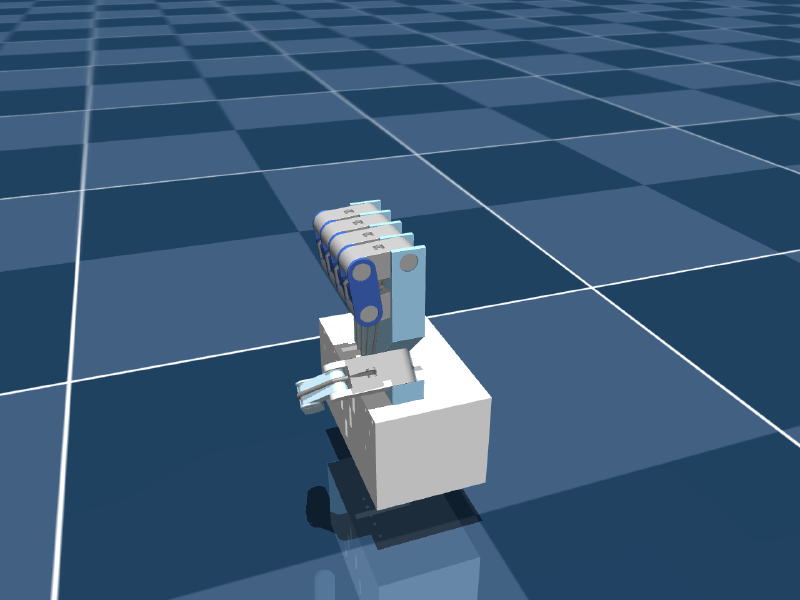
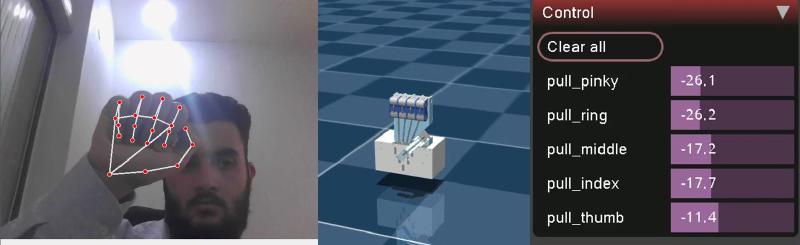
The design already has the servos… …and the twin already has the fist
The tendon hand closed into a fist in simulation
A live fist: every motor pulling at −11 to −26 N
Before anything moves a real string: SG90s stall and overheat against a taut tendon. Enforce per-finger angle limits in the driver, rate-limit, and fail safe on a stale topic — Stage 2’s watchdog is not optional once hardware is attached.

The one-line summary
#

Correctness first (measure in metres, command in millimetres of string), then robustness, then one tested codebase — and only then real servos, behind a watchdog and an authenticated topic.
Mulham Fetna
Author
Mulham Fetna
Renaissance Engineer
ROS 2 Tendon-Driven Hand MuJoCo Twin - This article is part of a series.
Part 20: This Article

Related

A webcam, some vector geometry, and a hand that moves

Everything in this series in one read: how a $20 webcam ends up driving a 15-DOF CAD model in real time, why every step is deliberately explicit rather than learned, and what broke along the way. You hold your hand up to a laptop camera. On the other half of the screen, a robotic hand — designed in CAD, never manufactured — closes its fingers at the same moment yours do. There is no glove, no marker, no depth sensor. Just an RGB webcam, two small neural networks, about forty lines of vector geometry, and a middleware stack that thinks it is talking to a real robot. All of it is open source under AGPL-3.0 and archived with a DOI: 10.5281/zenodo.22658556. flowchart LR A["📷 Webcam /dev/video0"] --> B["BlazePalm palm detector"] B --> C["Landmark regressor 21 × (x, y, z)"] C --> D["Dot-product geometry 15 interior angles"] D --> E["Normalize → flexion 0.0 straight · 1.0 curled"] E --> F["Lerp onto the URDF's mechanical limits"] F --> G["/joint_states"] G --> H["robot_state_publisher → /tf"] H --> I["🖥️ RViz digital twin"] The rule that shaped the build # There is an easier version of this project. Collect a few thousand frames of a hand next to the corresponding CAD poses, train a network to map one to the other, and let gradient descent work out the relationship.

How a webcam moves a simulated tendon-driven hand

One vision container turns webcam frames into five numbers. One simulation container turns those numbers into tendon forces. Everything else in this series is detail inside one of those two boxes — or the pipe between them. Left to right, three layers in one frame: vision (landmarks), simulation (the twin), actuation (live motor forces from MuJoCo’s Control panel). End to end # flowchart LR subgraph VISION["🐳 vision_tracker container"] direction TB A["Webcam frame 640×480 BGR"] --> B["MediaPipe Hands 21 landmarks"] B --> C["3 knuckle angles / finger dot product"] C --> D["mean → 1 curl angle (underactuation)"] D --> E["normalize + clip flexion 0..1"] end subgraph TWIN["🐳 mujoco_twin container"] direction TB F["lerp +50 N … −50 N"] --> G["data.ctrl on pull_{finger} motor"] G --> H["spatial tendon through 6 sites"] H --> I["3 passive hinge joints curl"] I --> J["MuJoCo viewer"] end E -- "ROS 2 · /hand/target_flexions sensor_msgs/JointState" --> F Stage What comes out Deep dive MediaPipe Hands 21 (x, y, z) landmarks per frame Part 4 Triplet angles 3 interior angles per finger, in radians Part 5 Averaging 1 curl angle per finger Part 6 Normalization flexion 0..1 (the thumb has its own window) Parts 7–8 ROS 2 topic JointState: names are fingers, positions are flexions Part 15 Lerp force in newtons per tendon Part 10 Tendon physics joint angles Part 11 Why the pipe carries flexions, not angles or forces # The contract between the containers is five unitless numbers: 0.0 is an open finger, 1.0 is a closed one. That choice is the architecture.

Docker Compose architecture for ROS 2: dependency-only images and mounted code

Both images hold dependencies and nothing else. The code and the robot model are mounted from your checkout at runtime — so an edit is a five-second restart, not a five-minute rebuild. The big picture # flowchart TB subgraph HOST["🐧 Linux host"] CAMDEV["/dev/video0"] GPU["/dev/dri · Intel iGPU"] X11["/tmp/.X11-unix XWayland :0"] SHM["/dev/shm Fast DDS segments"] NET["host network UDP multicast · domain 42"] REPO["repository checkout"] subgraph VT["🐳 vision_tracker · 2.9 GB image"] VN["vision_tracker_node.py mediapipe 0.10.14 · OpenCV"] end subgraph MT["🐳 mujoco_twin · 1.7 GB image"] MN["mujoco_twin_node.py mujoco 3.13.0 · GLFW"] end end CAMDEV --> VN GPU --> VN GPU --> MN X11 <--> VN X11 <--> MN VN <--> SHM <--> MN VN <--> NET <--> MN REPO -. "bind mount .:/workspace:ro" .-> VN REPO -. "bind mount .:/workspace:ro" .-> MN Repository layout # . ├── docker-compose.yml # both services, shared namespaces ├── setup_host.sh # xhost + device checks, once per login ├── vision_tracker/ │ ├── Dockerfile # ros:jazzy + mediapipe==0.10.14 │ ├── .dockerignore # src/ is mounted, so keep it out of the build context │ └── src/vision_tracker_node.py ├── mujoco_twin/ │ ├── Dockerfile # ros:jazzy + mujoco==3.13.0 │ ├── .dockerignore # src/ and model/ are mounted │ ├── src/mujoco_twin_node.py │ └── model/ # scene.xml → robot.xml (+ tendons.xml), assets/, config.json ├── standalone/main.py # the same pipeline, one process └── docs/ Each service folder is its own build context: editing the vision Dockerfile never invalidates the twin’s image cache, and neither build uploads the 13 MB of meshes it doesn’t need.

From an Onshape assembly to a MuJoCo model with onshape-to-robot

The simulated hand was never modelled by hand. It is an Onshape assembly — five SG90 servos, fifteen knuckle mates, a palm full of tendon channels — pulled through the Onshape API and written out as MuJoCo XML. Here is the design, and every setting that steers the export. Open the Onshape assembly The design # Your browser cannot play this video. Download video. Palm and fingers: four three-phalanx fingers and a three-segment thumb, every knuckle a revolute mate with limits. The RGB triads in the views are mate connectors. Tendon channels: one per finger, running down the palm into the base. Servo block: five SG90-class servos, staggered so each horn sits under a tendon exit. The design has a history # Start 2026-09-02 The first version in the history. v1.0.0 — MediaPipe 2026-09-06 The joint-angle-driven hand behind the RViz predecessor project. v1.0.1 → Main 2026-09-08 Point release and the main line the later work branches from. V3 → Mujoco branch 2026-09-16 The current design used by this twin — the version with the servo base block shown above. Onshape version history Mate features 43 part instances, 112 mate features: the 15 dof_* knuckle mates, the servo mates, and many Fastened mates.

ROS 2 across Docker containers: shared network, discovery and Fast DDS shared memory

“The topic shows up in ros2 topic list, but echo prints nothing” — the classic ROS-in-Docker symptom. Here’s why it happens, how two containers in this project share a network and a block of memory instead, and what that costs. How ROS 2 nodes find each other # ROS 2 has no master. Nodes discover each other through DDS — in Jazzy, eProsima Fast DDS by default — using the SPDP protocol: Each participant announces itself over UDP multicast (239.255.0.1) on ports derived from the domain ID \(d\): discovery multicast on \(7400 + 250d\), unicast on \(7410 + 250d + 2p\) for participant \(p\). For domain 42: UDP 17900 and 17910+. Peers exchange their topic endpoints; matching publishers and subscribers connect. Data flows over the best transport both support — shared memory when they share a host and /dev/shm, UDP otherwise. Why Docker’s default network breaks it # Compose attaches services to a bridge network — a private NATed subnet. Multicast isn’t reliably routed across it, and machines on your LAN can’t reach container IPs at all.