
  1. Projects/
  2. Tendon-Driven Robotic Hand — A Vision-Teleoperated MuJoCo Digital Twin/

The manual MJCF edits that turn a CAD export into a tendon-driven hand

Mulham Fetna
Author
Mulham Fetna
Renaissance Engineer
Table of Contents
ROS 2 Tendon-Driven Hand MuJoCo Twin - This article is part of a series.
Part 13: This Article
A raw CAD export gives you bodies, joints, meshes and sites — and a hand that does nothing. Four edits and one extra file turn it into a tendon-driven twin. One of those edits, it turns out, does nothing at all — which is worth understanding too.

Which edits survive a re-export
#

flowchart TB
    subgraph generated["robot.xml — regenerated by onshape-to-robot"]
        D["① joint defaults
manual — re-apply"] T["② tendons + ③ contacts
auto-injected from tendons.xml"] B["bodies · joints · sites · meshes
generated"] A["④ actuators
manual — re-apply"] end S["⑤ scene.xml
floor · lights · skybox
never regenerated"] -->|"include robot.xml"| generated
# Edit Lives in Survives re-export?
Joint friction / armature / damping defaults robot.xml <default> ✘ re-apply
Flexor + extensor spatial tendons tendons.xml → injected
Contact exclusions tendons.xml → injected
Five tendon motors robot.xml <actuator> ✘ re-apply
Environment scene.xml ✔ separate file

tendons.xml is kept byte-identical to the <tendon> and <contact> region of robot.xml. Tune a tendon in robot.xml without copying it back and the next export silently reverts it.

① Joint defaults — stability
#

<default class="ros2-tendon-driven-hand-gazebo-digital-twin">
  <joint frictionloss="0.001" armature="0.0001" damping="0.01"/>
Attribute Value Role
damping 0.01 N·m·s/rad stops a 2 g phalanx reaching absurd speed when 50 N yanks it
armature 0.0001 kg·m² rotor-like inertia on each joint’s diagonal — conditions the solver for very light bodies
frictionloss 0.001 N·m a small dry-friction dead-band so joints settle instead of creeping

Phalanges weigh 1.8–5.4 g. Without these, tiny inertias under large tendon forces blow up the integrator — an earlier, larger revision of the model logged Nan, Inf or huge value in QACC at DOF 128. The simulation is unstable.

These defaults add no stiffness — and that is exactly why the finger acts as a switch (Part 11).

② Tendons — a flexor and an extensor per finger
#

<spatial width="0.001" name="tendon_flex_index" stiffness="15" damping="0.05">
  <!-- <site site="horn_flex_index"/> -->
  <site site="palm_in_flex_index"/>
  <site site="palm_out_flex_index"/>
  <site site="proximal_flex_index"/>
  <site site="intermediate_in_flex_index"/>
  <site site="intermediate_out_flex_index"/>
  <site site="anchor_flex_index"/>
</spatial>

A spatial tendon is the shortest path through an ordered list of sites. Its length changes as the bodies carrying those sites move, and a force along it becomes joint torque through the moment arm at each site.
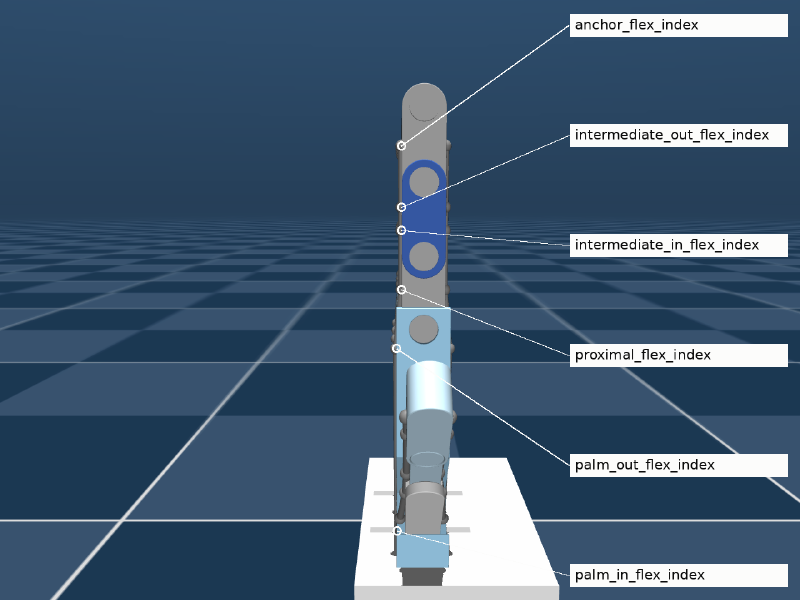
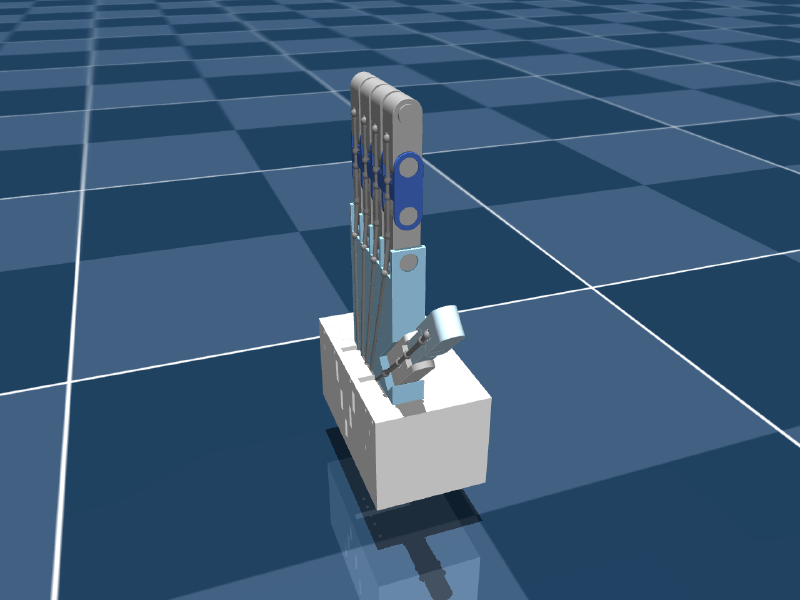
The index flexor tendon and its six via-point sites, labelled
palm_in → palm_out → proximal → intermediate_in → intermediate_out → anchor.
Site On body Purpose
palm_in, palm_out palm entry and exit of the palm channel
proximal proximal phalanx moment arm for the MCP joint
intermediate_in, intermediate_out intermediate phalanx moment arm for the PIP joint
anchor distal phalanx termination — its pull bends the DIP
Attribute Value Meaning
width 0.001 m render thickness only — the 1 mm strings in the viewer
stiffness 15 N/m spring along the tendon, around its initial length
damping 0.05 N·s/m velocity damping along the tendon
Every tendon site on the hand rendered
All 70 sites: flexor and extensor via-points for five digits, plus the horn sites.

The “horn hack”
#

The first site of every tendon — horn_*, on the servo horn — is commented out:

  • With it, a tendon starts on a rotating horn: you’d need a position-controlled servo_* hinge and rotary-to-linear string kinematics.
  • Without it, the tendon starts at the fixed palm entry, and a linear motor pulls it directly.

The control problem becomes “pull this string with F newtons.” The price: the horns in the model are decorative and spin freely. Restoring the horn sites with position servos is the path to a hardware-faithful twin.

③ Contact exclusions — redundant, and why
#

<contact>
  <exclude body1="part_1" body2="servo_horn"/>
  <exclude body1="part_1" body2="servo_horn_2"/>
  <exclude body1="part_1" body2="servo_horn_3"/>
  <exclude body1="part_1" body2="servo_horn_4"/>
  <exclude body1="part_1" body2="servo_horn_5"/>
</contact>

These were added to stop the flush-mounted horns being blasted out of the palm by contact forces. In the current model they change nothing, for two independent reasons:

  1. Parent–child filtering. Every horn is a direct child of part_1, and MuJoCo skips parent–child contacts by default.
  2. The collision class can’t self-collide. The export’s default is <geom group="3" contype="1" conaffinity="0"/>. Two geoms collide only if (contype₁ & conaffinity₂) || (contype₂ & conaffinity₁) — with conaffinity=0 on both, never.

Verified directly: 0 contacts at the open pose and at the full fist.

Consequence: fingers pass through each other and the palm. Harmless for a mirror twin — but to simulate grasping, give the object conaffinity="1", and give finger collision geoms conaffinity="1" if they should collide with each other.

④ Tendon motors
#

<actuator>
  <motor class="ros2-tendon-driven-hand-gazebo-digital-twin" name="pull_pinky"  tendon="tendon_flex_pinky"  ctrlrange="-50 50"/>
  <motor class="ros2-tendon-driven-hand-gazebo-digital-twin" name="pull_ring"   tendon="tendon_flex_ring"   ctrlrange="-50 50"/>
  <motor class="ros2-tendon-driven-hand-gazebo-digital-twin" name="pull_middle" tendon="tendon_flex_middle" ctrlrange="-50 50"/>
  <motor class="ros2-tendon-driven-hand-gazebo-digital-twin" name="pull_index"  tendon="tendon_flex_index"  ctrlrange="-50 50"/>
  <motor class="ros2-tendon-driven-hand-gazebo-digital-twin" name="pull_thumb"  tendon="tendon_flex_thumb"  ctrlrange="-50 50"/>
</actuator>

A <motor> is a direct force actuator — force = gear × ctrl — along the tendon. Only flexors are actuated; extensors are passive. Names are the API: the Python looks up pull_{finger}.

scene.xml — keep the world out of the generated file
#

<mujoco model="scene">
  <include file="robot.xml"/>
  <visual>
    <headlight diffuse="0.6 0.6 0.6" ambient="0.3 0.3 0.3" specular="0 0 0"/>
    <global azimuth="160" elevation="-20"/>
  </visual>
  <!-- skybox texture, checker ground material -->
  <worldbody>
    <light pos="0 0 3.5" dir="0 0 -1" directional="true"/>
    <geom name="floor" size="0 0 0.05" type="plane" material="groundplane"/>
  </worldbody>
</mujoco>

A re-export never touches lights or floor. Always load scene.xml.

Re-export checklist
#

  1. 1 · Commit

    So the export is a reviewable diff.
  2. 2 · Check tendons.xml

    Edits ② and ③ are injected from it.
  3. 3 · Export

    onshape-to-robot mujoco_twin/model
  4. 4 · Re-apply ① and ④

    Joint defaults in the default class; the <actuator> block, replacing generated servo actuators.
  5. 5 · Verify

    Load scene.xml and expect ntendon=10, nu=5; re-run docs/tools/make_figures.py all.
  6. 6 · Restart

    docker compose restart mujoco_twin
Mulham Fetna
Author
Mulham Fetna
Renaissance Engineer
ROS 2 Tendon-Driven Hand MuJoCo Twin - This article is part of a series.
Part 13: This Article

Related

From an Onshape assembly to a MuJoCo model with onshape-to-robot

The simulated hand was never modelled by hand. It is an Onshape assembly — five SG90 servos, fifteen knuckle mates, a palm full of tendon channels — pulled through the Onshape API and written out as MuJoCo XML. Here is the design, and every setting that steers the export. Open the Onshape assembly The design # Your browser cannot play this video. Download video. Palm and fingers: four three-phalanx fingers and a three-segment thumb, every knuckle a revolute mate with limits. The RGB triads in the views are mate connectors. Tendon channels: one per finger, running down the palm into the base. Servo block: five SG90-class servos, staggered so each horn sits under a tendon exit. The design has a history # Start 2026-09-02 The first version in the history. v1.0.0 — MediaPipe 2026-09-06 The joint-angle-driven hand behind the RViz predecessor project. v1.0.1 → Main 2026-09-08 Point release and the main line the later work branches from. V3 → Mujoco branch 2026-09-16 The current design used by this twin — the version with the servo base block shown above. Onshape version history Mate features 43 part instances, 112 mate features: the 15 dof_* knuckle mates, the servo mates, and many Fastened mates.

Inside the MuJoCo tendon hand model: bodies, joints, sites and sign conventions

A fixed palm, five three-segment digits, five free-spinning servo horns, ten strings through seventy points, five motors. Every number here was read from the compiled model with MuJoCo 3.13.0. Open (+50 N) Neutral (0 N) Fist (−50 N) Index tendon only Middle tendon only Ring tendon only Pinky tendon only Thumb tendon only Previous Next At a glance # Quantity Value Notes Bodies 22 world, palm, 15 phalanges, 5 servo horns Joints / DoF 20 / 20 all hinges; no free joint — the palm is welded to the world Knuckle joints 15 passive, 90° limits Servo horn joints 5 unlimited and unactuated Geoms 87 43 visual + 43 collision meshes + floor Meshes 14 STL Sites 70 tendon via-points and anchors Tendons 10 5 flexor (actuated) + 5 extensor (passive) Actuators 5 <motor> on flexors, ±50 N Timestep / integrator 0.002 s / Euler 500 steps per simulated second Total mass 0.398 kg palm block 341.8 g The kinematic tree # flowchart TB W["world"] --> P["part_1 · palm + servo block 341.8 g · 20 sites"] P --> I1["part_2_4 · index proximal 4.6 g · index_mcp"] --> I2["part_3_4 1.8 g · index_pip"] --> I3["part_4_4 4.6 g · index_dip"] P --> M1["part_2_3 · middle middle_mcp"] --> M2["part_3_3 middle_pip"] --> M3["part_4_3 middle_dip"] P --> R1["part_2_2 · ring ring_mcp"] --> R2["part_3_2 ring_pip"] --> R3["part_4_2 ring_dip"] P --> K1["part_2 · pinky pinky_mcp"] --> K2["part_3 pinky_pip"] --> K3["part_4 pinky_dip"] P --> T1["part_5 · thumb 5.4 g · thumb_cmc"] --> T2["part_6 2.4 g · thumb_mp"] --> T3["part_7 2.5 g · thumb_ip"] P --> H["servo_horn … servo_horn_5 0.3 g each"] Body names are CAD part names, not finger names. Repeated instances get _2, _3, … appended, so the pinky chain is part_2 → part_3 → part_4 and the index chain is part_2_4 → part_3_4 → part_4_4. Address joints, sites, tendons and actuators in code — never bodies. Joints and their signs # Joint Range (rad) Bend direction index_mcp, index_pip, index_dip [−1.571, 0] negative middle_mcp [−1.571, 0] negative middle_pip, middle_dip [0, +1.571] positive ring_mcp, ring_dip [−1.571, 0] negative ring_pip [0, +1.571] positive pinky_mcp, pinky_dip [−1.571, 0] negative pinky_pip [0, +1.571] positive thumb_cmc, thumb_mp, thumb_ip [−1.571, 0] negative servo_* × 5 unlimited — Bend direction is inconsistent, because each Onshape mate’s axis was exported as-is. Anything that reads joint angles must normalize per joint:

Underactuation: why three knuckle angles become one tendon command

avg_angle = np.mean(angles) looks like noise filtering. It isn’t. It is a mechanical decision: a human finger has three joints you can move separately, and this robot finger has one string. Not smoothing — compression # “Averaging” in a sensor pipeline usually means averaging over time to reduce noise. Nothing here keeps history between frames. The mean is taken across space — over the three joints of one finger in a single frame — to solve a problem called underactuation. The 3-to-1 problem # Human finger Robot finger Joints 3 (MCP, PIP, DIP) 3 hinges (*_mcp, *_pip, *_dip) Independent actuators many muscles; joints move semi-independently 1 flexor tendon, 1 motor Degrees of freedom you can command ~3 1 A system with fewer actuators than joints is underactuated. A single tendon threads all three joints of each robot finger, so the only command is “pull this string with force F” — and the joints share that pull according to routing geometry and dynamics. One string, six via-points, three joints. Pull it and all three knuckles move together. So the vision layer must compress three human measurements into one robot command.

Why the simulated tendon finger is a switch — and three fixes tested in MuJoCo

The vision layer sends a carefully normalized, smooth 0-to-1 signal. The simulated finger turns it into two states: open and closed. This is the most important thing to understand about the twin — and every number below was measured on the model in the repository. The measurement # The same flexion was applied to all five motors, the model simulated for 3 s from rest, and the steady-state joint angles recorded — 41 flexion values from 0 to 1. Flexion Force Index MCP / PIP / DIP Thumb CMC / MP / IP 0.000 +50.0 N −3.3° / −3.2° / −3.3° −2.9° / −2.7° / −2.7° 0.250 +25.0 N −1.7° / −1.6° / −1.7° −1.5° / −1.3° / −1.4° 0.500 0.0 N 0.0° / 0.0° / 0.0° 0.0° / 0.0° / 0.0° 0.625 −12.5 N 91.1° / 91.0° / 91.0° 90.6° / 53.9° / 45.6° 1.000 −50.0 N 94.0° / 93.8° / 93.9° 92.3° / 54.2° / 46.0° Joint limits are 90°; values just above it are MuJoCo’s soft limit being pressed.

From finger flexion to tendon force: linear interpolation onto a MuJoCo motor

On the far side of the ROS 2 topic, five flexions arrive and five tendon motors wait. One line of linear interpolation connects them — plus a name lookup that can fail silently, and a string that is allowed to push. The formula # $$F(t) = F_\text{open} + t\,(F_\text{closed} - F_\text{open}) = 50 + t\,(-50 - 50) = 50 - 100\,t$$FORCE_OPEN = 50.0 FORCE_CLOSED = -50.0 def _lerp(self, start_val, end_val, t): return start_val + t * (end_val - start_val) def apply_flexions(self, flexions): for finger, flexion_amount in flexions.items(): target_force = self._lerp(FORCE_OPEN, FORCE_CLOSED, flexion_amount) self.data.ctrl[self.motors[finger]] = target_force Three parts of one line # With \(t = 0.75\), a finger 75% closed: