

  1. Projects/

Tendon-Driven Robotic Hand — A Vision-Teleoperated MuJoCo Digital Twin

Mulham Fetna
Author
Mulham Fetna
Renaissance Engineer
Table of Contents
Hold your hand up to a webcam and a physics-simulated robotic hand — five strings, fifteen passive knuckles, designed in CAD — closes its fingers when you close yours.
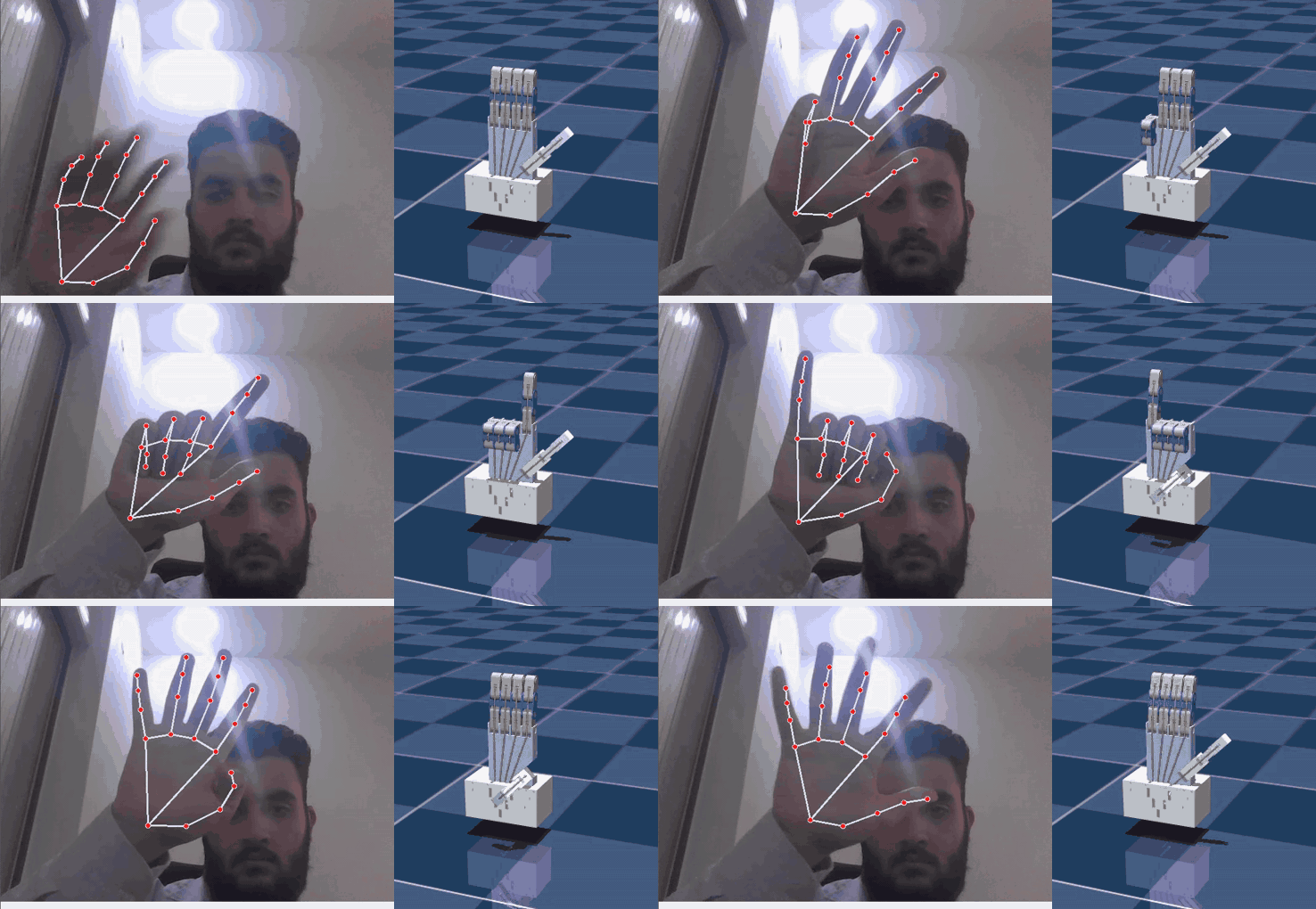
Live teleoperation: MediaPipe landmarks on the operator’s hand (left) and the MuJoCo tendon-driven twin mirroring it (right)
Recorded live from docker compose up: webcam + MediaPipe landmarks on the left, the MuJoCo digital twin on the right.

This is the successor to my ROS 2 MediaPipe robotic hand. That project animated a 15-DOF hand by setting joint angles in RViz. This one takes the harder, more physical route: the hand is tendon-driven and underactuated, like most 3D-printed and many research hands. Each finger has one flexor string pulled from the palm, and MuJoCo decides how that single pull curls three passive joints.

MediaPipe Hands
MuJoCo 3.13 spatial tendons
ROS 2 Jazzy in Docker Compose
Onshape → MJCF
AGPL-3.0 · Zenodo DOI

The code is open under AGPL-3.0 and DOI-archived (10.5281/zenodo.22775694), the Onshape assembly is public, and every number in the series below was measured on the repository.

Get the code on GitHub Run it in 10 minutes

The pipeline
#

flowchart TB
    subgraph V["🐳 vision_tracker"]
        direction LR
        A["📷 Webcam"] --> B["MediaPipe Hands
21 landmarks"] B --> C["3 knuckle angles
per finger → mean"] C --> D["Flexion
0.0 open · 1.0 closed"] end subgraph T["🐳 mujoco_twin"] direction LR E["Lerp → ±50 N"] --> F["Tendon motor
pull_{finger}"] F --> G["Spatial tendon
through 6 sites"] G --> H["🖐️ MuJoCo viewer"] end D -- "ROS 2 · /hand/target_flexions
sensor_msgs/JointState" --> E

Two containers share the host network (DDS discovery, visible across the LAN) and the host’s shared memory (Fast DDS moves messages through /dev/shm). The code is bind-mounted, not baked into the images, so an edit is a docker compose restart away.

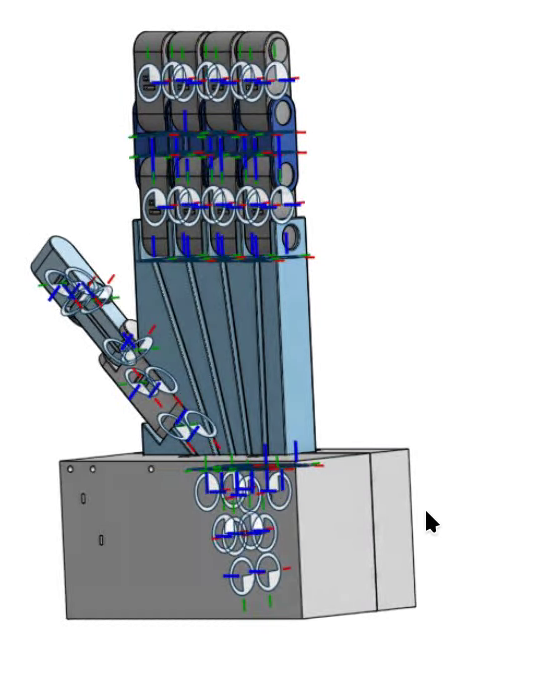
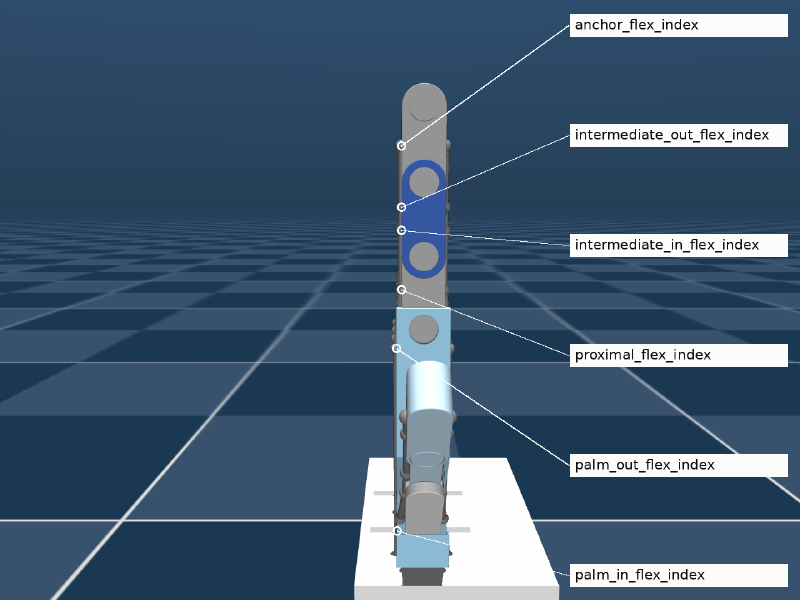
From CAD… …to a simulated tendon routing
The current Onshape assembly: fingers, thumb, palm tendon channels and servo base
The index finger flexor tendon threaded through six labelled via-point sites in MuJoCo

Watch it
#

What the measurements showed
#

Building the documentation meant measuring the system instead of describing it. Three results stood out, and each gets its own article:

The simulated fingers are switches. With force control and zero joint stiffness, −1 N of tendon pull closes a finger to its 90° stop — 1% of the ±50 N command range. Position control on tendon length gives a smooth curl instead. → Part 11
Filmstrip of the simulated hand at flexion 0.0, 0.5, 0.505, 0.51, 0.52 and 1.0 — only 0.505 shows a partial curl
Flexion 0.0 · 0.5 · 0.505 · 0.51 · 0.52 · 1.0. The whole proportional range fits between 0.50 and 0.51.
Image-normalized MediaPipe landmarks bend angles. A true 90° bend reads 73.7° when rotated 45° in a 640×480 frame, because x and y are divided by different image dimensions. World landmarks fix it. → Part 4
Docker costs nothing; a second OpenGL window does. MediaPipe takes 19.0 ms per frame in the container and 19.2 ms on the host — but 55–86 ms whenever a MuJoCo viewer renders at the same time, with or without Docker. → Part 19
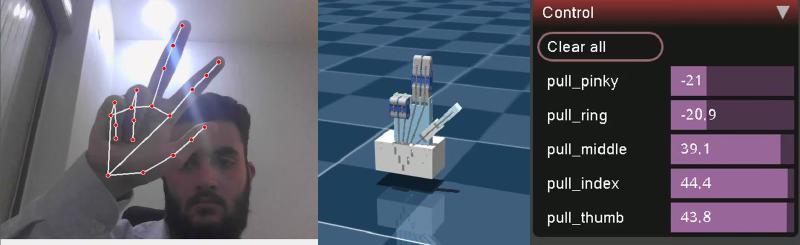
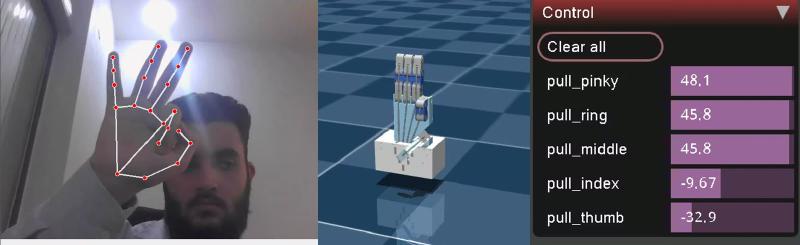
Peace sign OK sign
Peace sign: ring and pinky tendons pulled at −21 N, index, middle and thumb pushed open
OK sign: thumb pulled at −32.9 N and index at −9.7 N, other fingers open

Each frame shows all three layers at once: tracked hand, simulated hand, and the live tendon forces.

The 20-part series
#

Written as a tutorial you can follow end to end, or dip into by layer. Each part is self-contained and links to the exact files in the repository.

Getting started
#

  1. Run the tendon-driven hand digital twin — Docker Compose, a single Python script, the twin alone, or the model viewer.
  2. How a webcam moves a simulated tendon-driven hand — the whole system on one page. Start here if you only read one.
  3. Troubleshooting and FAQ — every error hit while building it, and the fix.

Vision — pixels to finger flexion
#

  1. MediaPipe Hands and the 16° angle trap — the two-stage model, 21 landmarks, and what the coordinates really mean.
  2. Joint angles from three landmarks — dot-product geometry and its two numerical traps.
  3. Why three knuckles become one number — underactuation, and what averaging throws away.
  4. Normalizing finger curl — the inverted min-max formula and where its constants come from.
  5. Why the thumb gets its own thresholds — a saddle joint, a narrow window, and its trade-off.
  6. Calibrating hand tracking to your hand — a procedure, and real flexions from a live session.

Actuation — flexion to finger motion
#

  1. From finger flexion to tendon force — linear interpolation, actuator lookup, and a string that pushes.
  2. Why the simulated finger is a switch — the measurement, the force balance, and three tested fixes.

Model — Onshape CAD to MuJoCo
#

  1. From an Onshape assembly to MuJoCo — the current design, onshape-to-robot, and config.json.
  2. The manual MJCF edits behind a tendon hand — tendons, the “horn hack”, contacts that never happen, and motors.
  3. Inside the MuJoCo tendon hand model — kinematic tree, joint sign conventions, site naming.

ROS 2 and containers
#

  1. The ROS 2 topic contract — one topic, two nodes, and pumping rclpy inside a render loop.
  2. Docker Compose architecture for ROS 2 — dependency-only images and mounted code.
  3. Shared network and shared memory in Docker — DDS discovery, domain IDs, LAN visibility, and Fast DDS SHM across containers.
  4. GUI, webcam and GPU passthrough — X11 on Wayland, /dev/dri, /dev/video0, and the cost of privileged.

Performance and production
#

  1. What limits the frame rate — a benchmark, what it ruled out, and the leading hypothesis.
  2. Roadmap to production — correctness, robustness, maintainability, real servos, deployment.

What it does not do (yet)
#

  • Partial poses. The twin mirrors open and closed fingers, not a half-curl — see Part 11 and issue #1.
  • Hardware. It simulates commands; the SG90 servos in the CAD are not driven yet (Part 20).
  • Self-collision. No geom pair in the model ever produces a contact (Part 13).
  • Smoothing. Landmark jitter passes straight through to the tendon forces.

Frequently asked questions
#

What is the tendon-driven robotic hand digital twin?
An open-source project by Mulham Fetna in which a standard RGB webcam and Google MediaPipe Hands track a person’s hand, and a MuJoCo physics simulation of an underactuated, tendon-driven robotic hand mirrors it in real time. Vision and simulation run as two ROS 2 Jazzy Docker containers that exchange five finger-flexion values over the topic /hand/target_flexions. The code is AGPL-3.0 licensed and archived on Zenodo under DOI 10.5281/zenodo.22775694.
How is a tendon-driven hand simulated in MuJoCo?
In this project each finger has a MuJoCo spatial tendon routed through six named sites from the palm to the fingertip, and a motor actuator applies a force along that tendon. The three finger joints are passive hinges, so MuJoCo’s solver decides how one tendon pull curls all three. The measured consequence is that with zero joint stiffness about −1 N of pull closes a finger fully, so position control of tendon length is recommended for proportional motion.
Does the project need a depth camera, gloves, or a GPU?
No depth camera, gloves, or markers are needed — any RGB webcam works, because MediaPipe infers 3D hand landmarks from single 2D frames. MediaPipe runs on the CPU at about 19 ms per frame on a laptop; the MuJoCo viewer runs well on integrated Intel graphics.
How do two ROS 2 Docker containers share memory and network in this project?
Both services use Docker Compose network_mode host so DDS discovery over UDP multicast works between containers and across the LAN (ROS_DOMAIN_ID 42, discovery range SUBNET), and ipc host plus pid host so Fast DDS can pass messages through shared memory segments in /dev/shm instead of the network stack.
How do I cite the tendon-driven hand digital twin?
Cite the Zenodo concept DOI 10.5281/zenodo.22775694, which always resolves to the latest version: Fetna, Mulham Mohammed, “Tendon-Driven Robotic Hand: Vision-Teleoperated MuJoCo Digital Twin”, Zenodo. The GitHub repository also provides a CITATION.cff file.

Cite it
#

@software{fetna_tendon_hand_mujoco_twin,
  author    = {Fetna, Mulham Mohammed},
  title     = {{Tendon-Driven Robotic Hand: Vision-Teleoperated MuJoCo Digital Twin}},
  year      = {2026},
  publisher = {Zenodo},
  doi       = {10.5281/zenodo.22775694},
  url       = {https://doi.org/10.5281/zenodo.22775694}
}

Why the thumb needs its own thresholds in hand tracking

Squeeze your thumb across your palm as hard as you can and, by the finger thresholds, it is only half closed. The thumb isn’t a finger with a shorter bone — it’s a different joint. Thumb curled, fingers open. Only pull_thumb goes negative (−19.5 N, flexion 0.69); every other motor pushes open. Hinges versus a saddle # Index to pinky are chains of hinge joints. A fist rolls them into a tight spiral, each knuckle approaching 90°. The thumb hangs from the carpometacarpal (CMC) saddle joint at the wrist. It sweeps across the palm — opposition — instead of simply curling. Much of “closing the thumb” is rotation of the whole thumb, not bending at its knuckles. What MediaPipe measures because of it # Interior angles come from 3D landmark positions, so the sweep only partly shows up as knuckle bend: Open Fully closed Travel Finger — mean of MCP/PIP/DIP ≈ 3.10 rad ≈ 1.60 rad 1.50 rad Thumb — mean of CMC/MCP/IP ≈ 2.90 rad ≈ 2.30 rad 0.60 rad A fully closed thumb stops near 2.30 rad (~132°). Even its open angle sits below a finger’s — a relaxed thumb is never in line with the wrist.
Why the simulated tendon finger is a switch — and three fixes tested in MuJoCo

The vision layer sends a carefully normalized, smooth 0-to-1 signal. The simulated finger turns it into two states: open and closed. This is the most important thing to understand about the twin — and every number below was measured on the model in the repository. The measurement # The same flexion was applied to all five motors, the model simulated for 3 s from rest, and the steady-state joint angles recorded — 41 flexion values from 0 to 1. Flexion Force Index MCP / PIP / DIP Thumb CMC / MP / IP 0.000 +50.0 N −3.3° / −3.2° / −3.3° −2.9° / −2.7° / −2.7° 0.250 +25.0 N −1.7° / −1.6° / −1.7° −1.5° / −1.3° / −1.4° 0.500 0.0 N 0.0° / 0.0° / 0.0° 0.0° / 0.0° / 0.0° 0.625 −12.5 N 91.1° / 91.0° / 91.0° 90.6° / 53.9° / 45.6° 1.000 −50.0 N 94.0° / 93.8° / 93.9° 92.3° / 54.2° / 46.0° Joint limits are 90°; values just above it are MuJoCo’s soft limit being pressed.

What limits the frame rate: MediaPipe, Docker and a MuJoCo viewer on one laptop

The single-script version felt smoother than the containers. The obvious suspect was Docker. The measurements say otherwise — and point at something more interesting: two programs sharing one integrated GPU. Setup # Laptop with an Intel Comet Lake CPU (12 threads) and Intel UHD Graphics; Linux on Wayland with XWayland; USB webcam at 640×480, 30 fps, YUYV. Each row: mean of 150 frames after a 10-frame warm-up, no hand in view. Measured 2026-09-16. The result # Condition Camera read MediaPipe imshow Loop Vision alone, container 10.0 ms 19.0 ms 4.5 ms 29.8 Hz Vision alone, host venv (MediaPipe 0.10.11) 10.6 ms 19.2 ms 3.9 ms 29.7 Hz Container vision + 1-core CPU burner 8.2 ms 23.5 ms 3.9 ms 28.1 Hz Host vision + plain MuJoCo viewer on host (no Docker, no ROS) 1.6 ms 54.9 ms 5.9 ms 16.0 Hz Container vision + mujoco_twin capped at 30 Hz 1.7 ms 63.7 ms 8.1 ms 13.6 Hz Container vision + mujoco_twin as shipped 1.9 ms 85.6 ms 10.2 ms 10.2 Hz End to end, ros2 topic hz /hand/target_flexions read 30.0 Hz with only vision_tracker running and 10.7 Hz once mujoco_twin started.

Underactuation: why three knuckle angles become one tendon command

avg_angle = np.mean(angles) looks like noise filtering. It isn’t. It is a mechanical decision: a human finger has three joints you can move separately, and this robot finger has one string. Not smoothing — compression # “Averaging” in a sensor pipeline usually means averaging over time to reduce noise. Nothing here keeps history between frames. The mean is taken across space — over the three joints of one finger in a single frame — to solve a problem called underactuation. The 3-to-1 problem # Human finger Robot finger Joints 3 (MCP, PIP, DIP) 3 hinges (*_mcp, *_pip, *_dip) Independent actuators many muscles; joints move semi-independently 1 flexor tendon, 1 motor Degrees of freedom you can command ~3 1 A system with fewer actuators than joints is underactuated. A single tendon threads all three joints of each robot finger, so the only command is “pull this string with force F” — and the joints share that pull according to routing geometry and dynamics. One string, six via-points, three joints. Pull it and all three knuckles move together. So the vision layer must compress three human measurements into one robot command.

Troubleshooting and FAQ: MuJoCo, MediaPipe and ROS 2 in Docker

Every entry here was hit, or deliberately checked, while building this project. Error messages are quoted exactly so a search for the message lands on the fix. Camera and windows # RuntimeError: Failed to open camera at index 0 # Something else holds the webcam — the standalone script, a previous container, a browser tab. Run docker compose down and close video apps. A camera opens in one process at a time. The camera is another node. ls /dev/video*, then map that device and set CAMERA_INDEX (many webcams expose /dev/video0 for frames and /dev/video1 for metadata — use the first). The device isn’t mapped. Check with docker compose config | grep video. Windows don’t open — cannot connect to X server, could not connect to display # Run ./setup_host.sh (it runs xhost +local:root). The permission resets when you log out. Make sure echo $DISPLAY on the host prints :0, or export DISPLAY before docker compose up. On Wayland, confirm XWayland is running: ls /tmp/.X11-unix/ should list X0. Black, blank or garbled OpenCV window # QT_X11_NO_MITSHM=1 must reach the container. It’s in the shared Compose environment — if a service defines its own environment:, it must merge the shared anchor with <<: *ros-env rather than replace it (Part 16).

The ROS 2 topic contract: one JointState topic, two nodes, and rclpy inside a render loop

The whole ROS 2 layer is one topic carrying five numbers. The interesting decisions are what those numbers mean, which message type carries them, and how to run a ROS subscriber when a 3D viewer owns your main thread. Why ROS 2 between vision and physics at all? # The single-process script works well. Splitting it across ROS 2 buys: Benefit Concretely Process isolation a MediaPipe crash doesn’t kill the simulator, and vice versa Independent environments vision and physics get their own container, dependencies and restarts Swappable endpoints replace the twin with a servo driver, or the tracker with a data glove Free observability ros2 topic echo, hz, bag record on the live stream Network transparency any machine on the LAN can subscribe The costs — a bigger stack, DDS configuration, one more hop — are small next to 19–85 ms of inference (Part 19). The node graph # flowchart LR subgraph C1["🐳 vision_tracker"] V["/vision_tracker_node timer · 30 Hz"] end subgraph C2["🐳 mujoco_twin"] T["/mujoco_twin_node spin_once in viewer loop"] end V -- "/hand/target_flexions sensor_msgs/JointState · depth 10" --> T V -. "any LAN subscriber ROS_DOMAIN_ID=42" .-> X["ros2 topic echo · rosbag future servo driver"] Every frame of the twin is driven by one JointState message like the one below. The contract # Field Value Topic /hand/target_flexions Type sensor_msgs/msg/JointState Publisher vision_tracker_node, timer at 30 Hz — effective rate bounded by inference Subscriber mujoco_twin_node QoS default reliable, keep-last 10 header.stamp publisher clock at publish time name ["thumb", "index", "middle", "ring", "pinky"] position flexion per finger, 0.0 open … 1.0 closed, same order as name velocity, effort empty A real message, captured with ros2 topic echo during testing (published by hand with ros2 topic pub, hence the zero stamp):

The manual MJCF edits that turn a CAD export into a tendon-driven hand

A raw CAD export gives you bodies, joints, meshes and sites — and a hand that does nothing. Four edits and one extra file turn it into a tendon-driven twin. One of those edits, it turns out, does nothing at all — which is worth understanding too. Which edits survive a re-export # flowchart TB subgraph generated["robot.xml — regenerated by onshape-to-robot"] D["① joint defaults manual — re-apply"] T["② tendons + ③ contacts auto-injected from tendons.xml"] B["bodies · joints · sites · meshes generated"] A["④ actuators manual — re-apply"] end S["⑤ scene.xml floor · lights · skybox never regenerated"] -->|"include robot.xml"| generated # Edit Lives in Survives re-export? ① Joint friction / armature / damping defaults robot.xml <default> ✘ re-apply ② Flexor + extensor spatial tendons tendons.xml → injected ✔ ③ Contact exclusions tendons.xml → injected ✔ ④ Five tendon motors robot.xml <actuator> ✘ re-apply ⑤ Environment scene.xml ✔ separate file tendons.xml is kept byte-identical to the <tendon> and <contact> region of robot.xml. Tune a tendon in robot.xml without copying it back and the next export silently reverts it. ① Joint defaults — stability # <default class="ros2-tendon-driven-hand-gazebo-digital-twin"> <joint frictionloss="0.001" armature="0.0001" damping="0.01"/> Attribute Value Role damping 0.01 N·m·s/rad stops a 2 g phalanx reaching absurd speed when 50 N yanks it armature 0.0001 kg·m² rotor-like inertia on each joint’s diagonal — conditions the solver for very light bodies frictionloss 0.001 N·m a small dry-friction dead-band so joints settle instead of creeping Phalanges weigh 1.8–5.4 g. Without these, tiny inertias under large tendon forces blow up the integrator — an earlier, larger revision of the model logged Nan, Inf or huge value in QACC at DOF 128. The simulation is unstable.

Run the tendon-driven hand digital twin in 10 minutes

Clone, run one setup script, run one Compose command — and a webcam window and a MuJoCo viewer open side by side, with a simulated hand that closes when you close yours. Here are four ways in, from the full stack down to the bare model. The goal of this article: both windows open, and the twin follows your hand. What you need # Requirement Check with Notes Linux desktop, X11 or XWayland echo $DISPLAY → :0 Wayland sessions work through XWayland Docker Engine + Compose v2 docker compose version Built with Docker 29.8 / Compose 5.5 A webcam ls /dev/video0 Close any other app using it GPU device nodes ls /dev/dri Intel/AMD out of the box; NVIDIA needs the container toolkit (Part 18) ~5 GB of disk images: vision 2.9 GB, twin 1.7 GB No ROS installation is needed on the host — ROS 2 Jazzy lives inside the containers. Four ways to run it # Docker Compose (full stack) Single Python script Twin only, no camera Model viewer git clone https://github.com/mulhamfetna/ros2-tendon-driven-hand-mujoco-digital-twin-vision-teleoperation.git cd ros2-tendon-driven-hand-mujoco-digital-twin-vision-teleoperation ./setup_host.sh # X11 access for the containers + camera/GPU checks (once per login) docker compose up --build # builds both images, starts vision_tracker and mujoco_twin Stop with Ctrl+C, then docker compose down to release the camera.

ROS 2 across Docker containers: shared network, discovery and Fast DDS shared memory

“The topic shows up in ros2 topic list, but echo prints nothing” — the classic ROS-in-Docker symptom. Here’s why it happens, how two containers in this project share a network and a block of memory instead, and what that costs. How ROS 2 nodes find each other # ROS 2 has no master. Nodes discover each other through DDS — in Jazzy, eProsima Fast DDS by default — using the SPDP protocol: Each participant announces itself over UDP multicast (239.255.0.1) on ports derived from the domain ID \(d\): discovery multicast on \(7400 + 250d\), unicast on \(7410 + 250d + 2p\) for participant \(p\). For domain 42: UDP 17900 and 17910+. Peers exchange their topic endpoints; matching publishers and subscribers connect. Data flows over the best transport both support — shared memory when they share a host and /dev/shm, UDP otherwise. Why Docker’s default network breaks it # Compose attaches services to a bridge network — a private NATed subnet. Multicast isn’t reliably routed across it, and machines on your LAN can’t reach container IPs at all.

Normalizing finger curl: from radians to a 0–1 flexion

Radians belong to the camera. Newtons belong to the robot. The number that crosses between them is a plain percentage — and producing it takes one inverted formula and one clip. The formula # RAW_STRAIGHT_ANGLE = 3.10 # ~177.6° — open finger RAW_CURLED_ANGLE = 1.60 # ~91.7° — fully curled finger flexion = (straight_limit - avg_angle) / (straight_limit - curled_limit) flexions[finger_name] = float(np.clip(flexion, 0.0, 1.0)) $$\text{flexion} = \operatorname{clip}\!\left(\frac{\theta_\text{straight} - \bar\theta}{\theta_\text{straight} - \theta_\text{curled}},\; 0,\; 1\right)$$ The three pieces # Denominator — the range. \(3.10 - 1.60 = 1.50\) rad of travel. It sets the scale.

MediaPipe Hands for robotics — and the 16° angle trap in normalized landmarks

Twenty-one points per frame, on a laptop CPU, from a flat RGB image. That is what MediaPipe hands to a robot. It is easy to treat as a black box — until you compute angles from it and discover the box stretched your coordinate space. Where MediaPipe sits # flowchart TB CAM["USB webcam 640×480 @ 30 fps · YUYV"] -->|"BGR frame"| RGB["cv2.cvtColor BGR → RGB"] RGB --> MP["MediaPipe Hands palm detector + landmark model"] MP -->|"21 × (x, y, z)"| ANG["Triplet angles Part 5"] ANG --> AVG["Average per finger Part 6"] AVG --> NORM["Flexion 0..1 Parts 7–8"] NORM -->|"/hand/target_flexions"| TWIN["MuJoCo twin"] The vision layer knows nothing about MuJoCo. Its entire output is five numbers between 0.0 (open) and 1.0 (closed). Two networks, not one # MediaPipe Hands is a cascade: BlazePalm, a single-shot detector, finds a palm bounding box in the full frame. Palms, not hands: a palm is close to a rigid square; a hand with moving fingers is not. A landmark model crops that region and regresses 21 keypoints, a hand-presence score and handedness. In video mode (static_image_mode=False) the detector barely runs. Landmarks from frame t define the crop for frame t+1, and the detector wakes only when tracking confidence drops. That shortcut is why this pipeline holds 30 fps on a CPU.

Inside the MuJoCo tendon hand model: bodies, joints, sites and sign conventions

A fixed palm, five three-segment digits, five free-spinning servo horns, ten strings through seventy points, five motors. Every number here was read from the compiled model with MuJoCo 3.13.0. Open (+50 N) Neutral (0 N) Fist (−50 N) Index tendon only Middle tendon only Ring tendon only Pinky tendon only Thumb tendon only Previous Next At a glance # Quantity Value Notes Bodies 22 world, palm, 15 phalanges, 5 servo horns Joints / DoF 20 / 20 all hinges; no free joint — the palm is welded to the world Knuckle joints 15 passive, 90° limits Servo horn joints 5 unlimited and unactuated Geoms 87 43 visual + 43 collision meshes + floor Meshes 14 STL Sites 70 tendon via-points and anchors Tendons 10 5 flexor (actuated) + 5 extensor (passive) Actuators 5 <motor> on flexors, ±50 N Timestep / integrator 0.002 s / Euler 500 steps per simulated second Total mass 0.398 kg palm block 341.8 g The kinematic tree # flowchart TB W["world"] --> P["part_1 · palm + servo block 341.8 g · 20 sites"] P --> I1["part_2_4 · index proximal 4.6 g · index_mcp"] --> I2["part_3_4 1.8 g · index_pip"] --> I3["part_4_4 4.6 g · index_dip"] P --> M1["part_2_3 · middle middle_mcp"] --> M2["part_3_3 middle_pip"] --> M3["part_4_3 middle_dip"] P --> R1["part_2_2 · ring ring_mcp"] --> R2["part_3_2 ring_pip"] --> R3["part_4_2 ring_dip"] P --> K1["part_2 · pinky pinky_mcp"] --> K2["part_3 pinky_pip"] --> K3["part_4 pinky_dip"] P --> T1["part_5 · thumb 5.4 g · thumb_cmc"] --> T2["part_6 2.4 g · thumb_mp"] --> T3["part_7 2.5 g · thumb_ip"] P --> H["servo_horn … servo_horn_5 0.3 g each"] Body names are CAD part names, not finger names. Repeated instances get _2, _3, … appended, so the pinky chain is part_2 → part_3 → part_4 and the index chain is part_2_4 → part_3_4 → part_4_4. Address joints, sites, tendons and actuators in code — never bodies. Joints and their signs # Joint Range (rad) Bend direction index_mcp, index_pip, index_dip [−1.571, 0] negative middle_mcp [−1.571, 0] negative middle_pip, middle_dip [0, +1.571] positive ring_mcp, ring_dip [−1.571, 0] negative ring_pip [0, +1.571] positive pinky_mcp, pinky_dip [−1.571, 0] negative pinky_pip [0, +1.571] positive thumb_cmc, thumb_mp, thumb_ip [−1.571, 0] negative servo_* × 5 unlimited — Bend direction is inconsistent, because each Onshape mate’s axis was exported as-is. Anything that reads joint angles must normalize per joint:

How a webcam moves a simulated tendon-driven hand

One vision container turns webcam frames into five numbers. One simulation container turns those numbers into tendon forces. Everything else in this series is detail inside one of those two boxes — or the pipe between them. Left to right, three layers in one frame: vision (landmarks), simulation (the twin), actuation (live motor forces from MuJoCo’s Control panel). End to end # flowchart LR subgraph VISION["🐳 vision_tracker container"] direction TB A["Webcam frame 640×480 BGR"] --> B["MediaPipe Hands 21 landmarks"] B --> C["3 knuckle angles / finger dot product"] C --> D["mean → 1 curl angle (underactuation)"] D --> E["normalize + clip flexion 0..1"] end subgraph TWIN["🐳 mujoco_twin container"] direction TB F["lerp +50 N … −50 N"] --> G["data.ctrl on pull_{finger} motor"] G --> H["spatial tendon through 6 sites"] H --> I["3 passive hinge joints curl"] I --> J["MuJoCo viewer"] end E -- "ROS 2 · /hand/target_flexions sensor_msgs/JointState" --> F Stage What comes out Deep dive MediaPipe Hands 21 (x, y, z) landmarks per frame Part 4 Triplet angles 3 interior angles per finger, in radians Part 5 Averaging 1 curl angle per finger Part 6 Normalization flexion 0..1 (the thumb has its own window) Parts 7–8 ROS 2 topic JointState: names are fingers, positions are flexions Part 15 Lerp force in newtons per tendon Part 10 Tendon physics joint angles Part 11 Why the pipe carries flexions, not angles or forces # The contract between the containers is five unitless numbers: 0.0 is an open finger, 1.0 is a closed one. That choice is the architecture.

GUI, webcam and GPU passthrough for ROS 2 and MuJoCo containers

Containers are headless by design. This project needs two windows, a webcam and a GPU — so the Compose file spends most of its lines punching carefully chosen holes back through the isolation. Two containers, two windows, one X display: the Qt/OpenCV tracker (vision_tracker) and the GLFW MuJoCo viewer (mujoco_twin), recorded on Wayland through XWayland. Windows: pass the X11 socket through # environment: DISPLAY: ${DISPLAY:-:0} QT_X11_NO_MITSHM: 1 volumes: - /tmp/.X11-unix:/tmp/.X11-unix:rw Piece What it does /tmp/.X11-unix mount the X server listens on a Unix socket here (X0 for :0); mounting it gives the container a line to it DISPLAY tells X clients (GLFW, Qt) which display to use; defaults to :0 QT_X11_NO_MITSHM=1 stops Qt — OpenCV’s imshow backend — from using MIT-SHM, which fails across containers and gives blank or garbled windows xhost +local:root (in setup_host.sh) the X server refuses untrusted clients; this admits local root, which is who the containers run as On Wayland # Wayland sessions (KDE Plasma, GNOME) still run XWayland on :0, and both windows open through it — the recording above was made exactly that way. Running MuJoCo natively on a Wayland host, GLFW may warn Wayland: The platform does not provide the window position; it’s harmless.

From tutorial project to production robot: a roadmap for the tendon hand twin

The system works, and it teaches well. Getting it to drive real servos safely is a sequence of well-scoped upgrades — each one grounded in a limitation measured earlier in this series. Where it stands # Area Today Production target Hand tracking image-normalized landmarks, one global calibration metric world landmarks, per-finger calibration, a temporal filter Command mapping flexion → ±50 N; the twin is a switch flexion → tendon length; proportional curl Physics model force motors, decorative horns, no self-contact position servos on horns, tuned stiffness, contacts for grasping Middleware one topic, default QoS, open on the LAN parameters, explicit QoS, a watchdog, SROS 2 Containers privileged, host namespaces, root, xhost least privilege, non-root, optional headless Code classes copied into three files, no tests one shared package, tests, CI Hardware simulation only a servo driver on the same topic Stage 1 · Correctness Measure the right thing, command the right quantity World landmarks. Image-normalized coordinates bend angles by up to 16° with hand orientation (Part 4). Read multi_hand_world_landmarks instead, then recalibrate.

From finger flexion to tendon force: linear interpolation onto a MuJoCo motor

On the far side of the ROS 2 topic, five flexions arrive and five tendon motors wait. One line of linear interpolation connects them — plus a name lookup that can fail silently, and a string that is allowed to push. The formula # $$F(t) = F_\text{open} + t\,(F_\text{closed} - F_\text{open}) = 50 + t\,(-50 - 50) = 50 - 100\,t$$FORCE_OPEN = 50.0 FORCE_CLOSED = -50.0 def _lerp(self, start_val, end_val, t): return start_val + t * (end_val - start_val) def apply_flexions(self, flexions): for finger, flexion_amount in flexions.items(): target_force = self._lerp(FORCE_OPEN, FORCE_CLOSED, flexion_amount) self.data.ctrl[self.motors[finger]] = target_force Three parts of one line # With \(t = 0.75\), a finger 75% closed:

From an Onshape assembly to a MuJoCo model with onshape-to-robot

The simulated hand was never modelled by hand. It is an Onshape assembly — five SG90 servos, fifteen knuckle mates, a palm full of tendon channels — pulled through the Onshape API and written out as MuJoCo XML. Here is the design, and every setting that steers the export. Open the Onshape assembly The design # Your browser cannot play this video. Download video. Palm and fingers: four three-phalanx fingers and a three-segment thumb, every knuckle a revolute mate with limits. The RGB triads in the views are mate connectors. Tendon channels: one per finger, running down the palm into the base. Servo block: five SG90-class servos, staggered so each horn sits under a tendon exit. The design has a history # Start 2026-09-02 The first version in the history. v1.0.0 — MediaPipe 2026-09-06 The joint-angle-driven hand behind the RViz predecessor project. v1.0.1 → Main 2026-09-08 Point release and the main line the later work branches from. V3 → Mujoco branch 2026-09-16 The current design used by this twin — the version with the servo base block shown above. Onshape version history Mate features 43 part instances, 112 mate features: the 15 dof_* knuckle mates, the servo mates, and many Fastened mates.

Finger joint angles from three hand landmarks: the dot-product geometry

Every knuckle angle in this project comes from three landmarks and one dot product. No learning, no lookup table — just the definition of the angle between two vectors, plus two guards that keep a single glitchy frame from sending NaN into a motor command. Three points make an angle # An angle needs a vertex and two rays. A knuckle is the vertex; the two bones meeting there are the rays: a base point, where the previous bone starts, the vertex — the knuckle being measured, an end point, where the next bone ends. flowchart LR P1(("p1 base")) -- "v1 = p1 − p2" --- P2(("p2 vertex knuckle")) P2 -- "v2 = p3 − p2" --- P3(("p3 end")) The triplet table # self.finger_triplets = { "thumb": [(0, 1, 2), (1, 2, 3), (2, 3, 4)], "index": [(0, 5, 6), (5, 6, 7), (6, 7, 8)], "middle": [(0, 9, 10), (9, 10, 11), (10, 11, 12)], "ring": [(0, 13, 14), (13, 14, 15), (14, 15, 16)], "pinky": [(0, 17, 18), (17, 18, 19), (18, 19, 20)] } Landmark 0 — the wrist — starts every finger’s first triplet. Finger Triplet Vertex Joint measured Index (0, 5, 6) 5 MCP — joins finger to palm Index (5, 6, 7) 6 PIP — middle knuckle Index (6, 7, 8) 7 DIP — fingertip knuckle Thumb (0, 1, 2) 1 CMC — saddle joint at the wrist Thumb (1, 2, 3) 2 MCP Thumb (2, 3, 4) 3 IP Why every first triplet starts at 0. The palm has no landmark of its own, so the wrist → knuckle line stands in for the metacarpal bone. It isn’t exactly collinear with a straight finger — ring and pinky metacarpals fan outward — so a relaxed straight finger rarely measures a full \(\pi\). That’s part of why the calibrated “straight” threshold is 3.10 rad rather than 3.14.

Docker Compose architecture for ROS 2: dependency-only images and mounted code

Both images hold dependencies and nothing else. The code and the robot model are mounted from your checkout at runtime — so an edit is a five-second restart, not a five-minute rebuild. The big picture # flowchart TB subgraph HOST["🐧 Linux host"] CAMDEV["/dev/video0"] GPU["/dev/dri · Intel iGPU"] X11["/tmp/.X11-unix XWayland :0"] SHM["/dev/shm Fast DDS segments"] NET["host network UDP multicast · domain 42"] REPO["repository checkout"] subgraph VT["🐳 vision_tracker · 2.9 GB image"] VN["vision_tracker_node.py mediapipe 0.10.14 · OpenCV"] end subgraph MT["🐳 mujoco_twin · 1.7 GB image"] MN["mujoco_twin_node.py mujoco 3.13.0 · GLFW"] end end CAMDEV --> VN GPU --> VN GPU --> MN X11 <--> VN X11 <--> MN VN <--> SHM <--> MN VN <--> NET <--> MN REPO -. "bind mount .:/workspace:ro" .-> VN REPO -. "bind mount .:/workspace:ro" .-> MN Repository layout # . ├── docker-compose.yml # both services, shared namespaces ├── setup_host.sh # xhost + device checks, once per login ├── vision_tracker/ │ ├── Dockerfile # ros:jazzy + mediapipe==0.10.14 │ ├── .dockerignore # src/ is mounted, so keep it out of the build context │ └── src/vision_tracker_node.py ├── mujoco_twin/ │ ├── Dockerfile # ros:jazzy + mujoco==3.13.0 │ ├── .dockerignore # src/ and model/ are mounted │ ├── src/mujoco_twin_node.py │ └── model/ # scene.xml → robot.xml (+ tendons.xml), assets/, config.json ├── standalone/main.py # the same pipeline, one process └── docs/ Each service folder is its own build context: editing the vision Dockerfile never invalidates the twin’s image cache, and neither build uploads the 13 MB of meshes it doesn’t need.

Calibrating hand tracking to your own hand — with real data from a live session

The shipped thresholds were measured on one hand with one webcam. Here is how to measure yours — and what a live recording revealed about how far off “good enough” can be while the twin still looks perfect. Symptoms that call for calibration # What you see in the published flexions Cause Change A fist, but flexion stays below 1.0 your fist angle is above the curled limit raise *_CURLED_ANGLE to your fist reading Flexion hits 1.0 with the hand half closed curled limit too high lower *_CURLED_ANGLE Flexion above 0 with a relaxed open hand your open angle is below the straight limit lower *_STRAIGHT_ANGLE to your open reading The thumb flickers thumb window too narrow for your jitter widen it (Part 8) Calibrate against the numbers, not the render. With the current force-control tuning, the simulated finger snaps shut past flexion ≈ 0.51 (Part 11), so most calibration errors are invisible in the viewer. Watch ros2 topic echo /hand/target_flexions. Real data: what a live session produced # MuJoCo’s viewer has a Control panel showing the live force of every motor. Since the force is \(F = 50 - 100 \cdot \text{flexion}\), every recorded frame gives back the exact flexion the tracker published: flexion = (50 − F) / 100.
Mulham Fetna
Author
Mulham Fetna
Renaissance Engineer