
  1. Projects/
  2. Tendon-Driven Robotic Hand — A Vision-Teleoperated MuJoCo Digital Twin/

Calibrating hand tracking to your own hand — with real data from a live session

Mulham Fetna
Author
Mulham Fetna
Renaissance Engineer
Table of Contents
ROS 2 Tendon-Driven Hand MuJoCo Twin - This article is part of a series.
Part 9: This Article
The shipped thresholds were measured on one hand with one webcam. Here is how to measure yours — and what a live recording revealed about how far off “good enough” can be while the twin still looks perfect.

Symptoms that call for calibration
#

What you see in the published flexions Cause Change
A fist, but flexion stays below 1.0 your fist angle is above the curled limit raise *_CURLED_ANGLE to your fist reading
Flexion hits 1.0 with the hand half closed curled limit too high lower *_CURLED_ANGLE
Flexion above 0 with a relaxed open hand your open angle is below the straight limit lower *_STRAIGHT_ANGLE to your open reading
The thumb flickers thumb window too narrow for your jitter widen it (Part 8)
Calibrate against the numbers, not the render. With the current force-control tuning, the simulated finger snaps shut past flexion ≈ 0.51 (Part 11), so most calibration errors are invisible in the viewer. Watch ros2 topic echo /hand/target_flexions.

Real data: what a live session produced
#

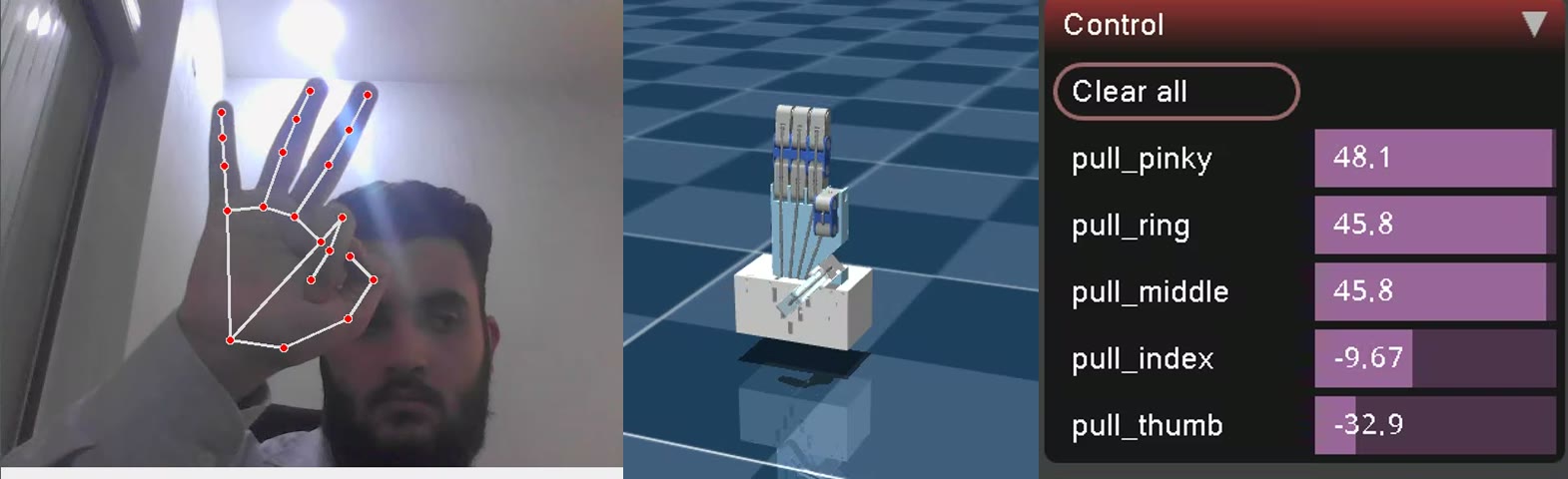
MuJoCo’s viewer has a Control panel showing the live force of every motor. Since the force is \(F = 50 - 100 \cdot \text{flexion}\), every recorded frame gives back the exact flexion the tracker published: flexion = (50 − F) / 100.
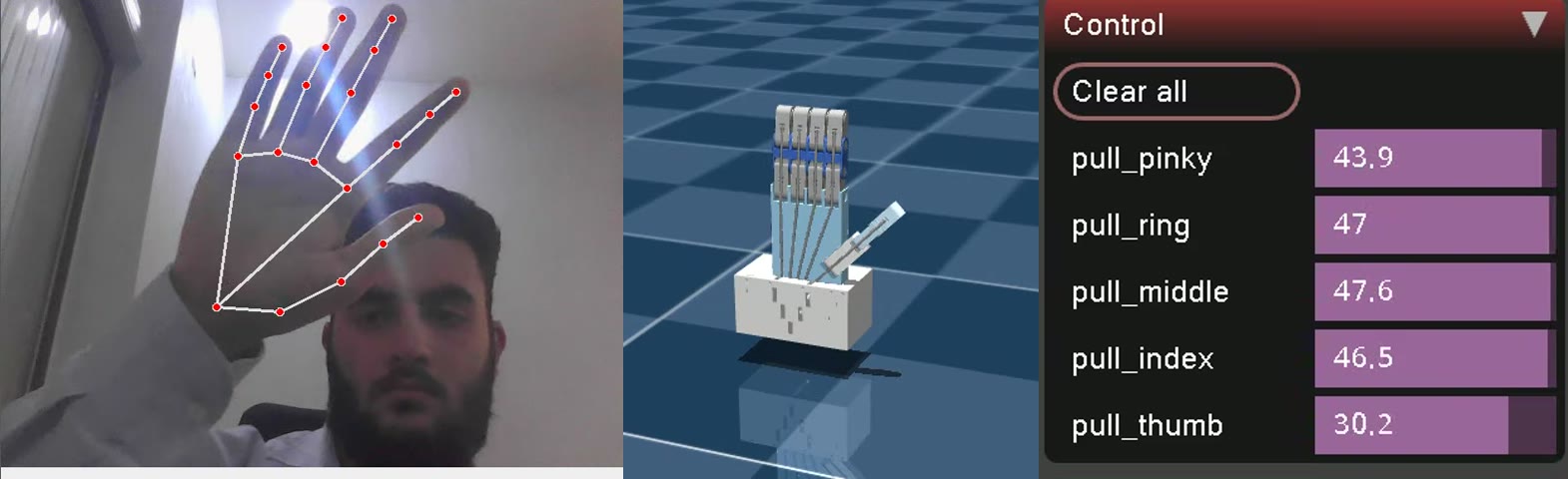
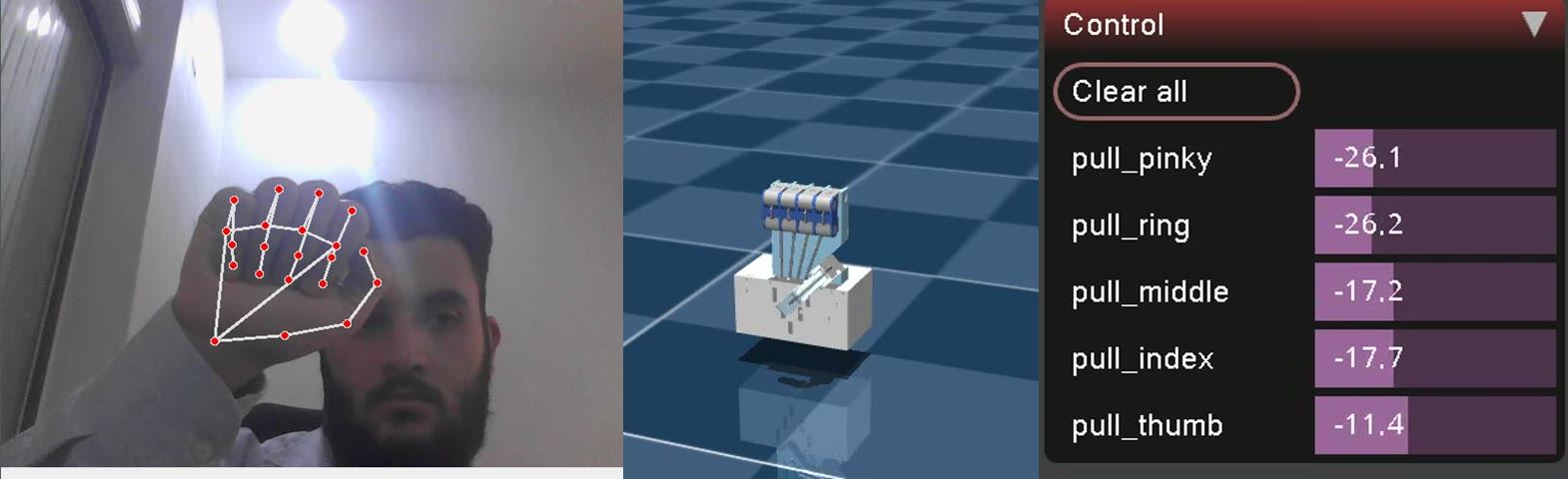
Pose pinky ring middle index thumb
Open hand +43.9 N → 0.06 +47.0 N → 0.03 +47.6 N → 0.02 +46.5 N → 0.04 +30.2 N → 0.20
Peace sign −21.0 N → 0.71 −20.9 N → 0.71 +39.1 N → 0.11 +44.4 N → 0.06 +43.8 N → 0.06
Fist −26.1 N → 0.76 −26.2 N → 0.76 −17.2 N → 0.67 −17.7 N → 0.68 −11.4 N → 0.61
OK sign +48.1 N → 0.02 +45.8 N → 0.04 +45.8 N → 0.04 −9.7 N → 0.60 −32.9 N → 0.83
Thumb curled +47.5 N → 0.03 +47.3 N → 0.03 +47.5 N → 0.03 +45.2 N → 0.05 −19.5 N → 0.69

Reading it like a calibrator:

  • The open hand is well calibrated — fingers at 0.02–0.06. The thumb at 0.20 means this operator’s relaxed thumb sits about 0.12 rad below THUMB_STRAIGHT_ANGLE; lowering it by ~0.1 brings the open thumb to ~0.
  • The fist never reaches 1.0. Fingers top out at 0.67–0.76, the thumb at 0.61 — the fist angles sit above the curled limits. Raising RAW_CURLED_ANGLE (and THUMB_CURLED_ANGLE) toward the measured fist values would use the full range.
  • Middle and index curl less than ring and pinky in the same fist (0.67 vs 0.76) — an argument for per-finger windows.
  • The twin still looked right in every pose, because anything above ~0.51 already closes a finger. These gaps only become visible once actuation is proportional.

The procedure
#

  1. 1 · Print the raw angles

    Temporary diagnostic in get_finger_flexions

    for finger_name, triplets in self.finger_triplets.items():
        angles = [self._calculate_angle(lm[p1], lm[p2], lm[p3]) for p1, p2, p3 in triplets]
        avg_angle = np.mean(angles)
        print(f"{finger_name:>6}: {avg_angle:.2f}", end="  ")   # TEMPORARY

    Add a bare print() after the loop to end the line.

  2. 2 · Run it

    Standalone for the fastest feedback

    env -u PYTHONPATH venv/bin/python standalone/main.py — or in containers, docker compose up vision_tracker and docker compose logs -f vision_tracker.
  3. 3 · Measure open

    Relaxed, not hyperextended

    Hold your hand the way you’ll hold it while operating. Read the value each finger settles around — typically 3.0–3.1 for fingers and 2.7–3.0 for the thumb. These become RAW_STRAIGHT_ANGLE and THUMB_STRAIGHT_ANGLE.
  4. 4 · Measure closed

    A comfortable full fist, thumb tucked

    Typically 1.5–1.8 for fingers and 2.1–2.4 for the thumb. These become RAW_CURLED_ANGLE and THUMB_CURLED_ANGLE.
  5. 5 · Write the constants — in every copy

    Leave a 0.05 rad margin

    Set the straight limit ~0.05 rad below your open reading and the curled limit ~0.05 rad above your fist reading, so relaxed poses reliably clip to exactly 0 and 1. The constants live in standalone/main.py, vision_tracker/src/vision_tracker_node.py, and the guard in docs/tools/make_figures.py. For the container, docker compose restart vision_tracker — no rebuild.
  6. 6 · Remove the print

    Printing 30 times a second costs real time in the loop.

Going further: per-finger windows
#

The data above already argues for it:

CALIBRATION = {                     # (straight, curled) in radians — measure your own
    "thumb":  (2.80, 2.50),
    "index":  (3.10, 2.10),
    "middle": (3.10, 2.10),
    "ring":   (3.10, 1.95),
    "pinky":  (3.10, 1.95),
}

(Values back-computed from the live table above — e.g. a finger fist flexion of 0.67 means an average angle of 3.10 − 0.67 × 1.50 ≈ 2.10 rad. Measure your own rather than copying.) In production these belong in a ROS 2 parameter file, so recalibrating never touches source code.
Mulham Fetna
Author
Mulham Fetna
Renaissance Engineer
ROS 2 Tendon-Driven Hand MuJoCo Twin - This article is part of a series.
Part 9: This Article

Related

MediaPipe Hands for robotics — and the 16° angle trap in normalized landmarks

Twenty-one points per frame, on a laptop CPU, from a flat RGB image. That is what MediaPipe hands to a robot. It is easy to treat as a black box — until you compute angles from it and discover the box stretched your coordinate space. Where MediaPipe sits # flowchart TB CAM["USB webcam 640×480 @ 30 fps · YUYV"] -->|"BGR frame"| RGB["cv2.cvtColor BGR → RGB"] RGB --> MP["MediaPipe Hands palm detector + landmark model"] MP -->|"21 × (x, y, z)"| ANG["Triplet angles Part 5"] ANG --> AVG["Average per finger Part 6"] AVG --> NORM["Flexion 0..1 Parts 7–8"] NORM -->|"/hand/target_flexions"| TWIN["MuJoCo twin"] The vision layer knows nothing about MuJoCo. Its entire output is five numbers between 0.0 (open) and 1.0 (closed). Two networks, not one # MediaPipe Hands is a cascade: BlazePalm, a single-shot detector, finds a palm bounding box in the full frame. Palms, not hands: a palm is close to a rigid square; a hand with moving fingers is not. A landmark model crops that region and regresses 21 keypoints, a hand-presence score and handedness. In video mode (static_image_mode=False) the detector barely runs. Landmarks from frame t define the crop for frame t+1, and the detector wakes only when tracking confidence drops. That shortcut is why this pipeline holds 30 fps on a CPU.

Why the thumb needs its own thresholds in hand tracking

Squeeze your thumb across your palm as hard as you can and, by the finger thresholds, it is only half closed. The thumb isn’t a finger with a shorter bone — it’s a different joint. Thumb curled, fingers open. Only pull_thumb goes negative (−19.5 N, flexion 0.69); every other motor pushes open. Hinges versus a saddle # Index to pinky are chains of hinge joints. A fist rolls them into a tight spiral, each knuckle approaching 90°. The thumb hangs from the carpometacarpal (CMC) saddle joint at the wrist. It sweeps across the palm — opposition — instead of simply curling. Much of “closing the thumb” is rotation of the whole thumb, not bending at its knuckles. What MediaPipe measures because of it # Interior angles come from 3D landmark positions, so the sweep only partly shows up as knuckle bend: Open Fully closed Travel Finger — mean of MCP/PIP/DIP ≈ 3.10 rad ≈ 1.60 rad 1.50 rad Thumb — mean of CMC/MCP/IP ≈ 2.90 rad ≈ 2.30 rad 0.60 rad A fully closed thumb stops near 2.30 rad (~132°). Even its open angle sits below a finger’s — a relaxed thumb is never in line with the wrist.

How MediaPipe sees a hand — and exactly where it fails

Twenty-one points, thirty frames a second, on a CPU, from a flat RGB image with no depth information. This is how that is possible — and the four failure modes you will meet the first time you rely on it. Every vision-driven robotics project has a moment where the camera stops being a camera and starts being a sensor. For this one, that moment is MediaPipe Hands: a webcam frame goes in, and 21 numbered points in space come out. It is easy to treat that as a black box. It is also a mistake, because the box has a specific shape, and its failure modes follow directly from how it was built. It is two networks, not one # The single most useful thing to know about MediaPipe Hands is that it is a cascade: a detector and a regressor, with completely different jobs. flowchart TB A["📷 Full frame e.g. 640 × 480"] --> B["Stage 1 — BlazePalm SSD detector"] B --> C["Oriented palm crop 256 × 256"] C --> D["Stage 2 — Landmark regressor MobileNetV2-style encoder"] D --> E["63 floats 21 landmarks × (x, y, z)"] D --> F["Presence score"] D --> G["Handedness left / right"] F -->|"confidence ≥ 0.5"| C F -->|"confidence < 0.5"| B The regressor’s output, drawn back onto the frame: 21 points and the connections between them. Stage 1 — BlazePalm detects palms, never fingers # This is the design decision the whole system rests on.

Finger joint angles from three hand landmarks: the dot-product geometry

Every knuckle angle in this project comes from three landmarks and one dot product. No learning, no lookup table — just the definition of the angle between two vectors, plus two guards that keep a single glitchy frame from sending NaN into a motor command. Three points make an angle # An angle needs a vertex and two rays. A knuckle is the vertex; the two bones meeting there are the rays: a base point, where the previous bone starts, the vertex — the knuckle being measured, an end point, where the next bone ends. flowchart LR P1(("p1 base")) -- "v1 = p1 − p2" --- P2(("p2 vertex knuckle")) P2 -- "v2 = p3 − p2" --- P3(("p3 end")) The triplet table # self.finger_triplets = { "thumb": [(0, 1, 2), (1, 2, 3), (2, 3, 4)], "index": [(0, 5, 6), (5, 6, 7), (6, 7, 8)], "middle": [(0, 9, 10), (9, 10, 11), (10, 11, 12)], "ring": [(0, 13, 14), (13, 14, 15), (14, 15, 16)], "pinky": [(0, 17, 18), (17, 18, 19), (18, 19, 20)] } Landmark 0 — the wrist — starts every finger’s first triplet. Finger Triplet Vertex Joint measured Index (0, 5, 6) 5 MCP — joins finger to palm Index (5, 6, 7) 6 PIP — middle knuckle Index (6, 7, 8) 7 DIP — fingertip knuckle Thumb (0, 1, 2) 1 CMC — saddle joint at the wrist Thumb (1, 2, 3) 2 MCP Thumb (2, 3, 4) 3 IP Why every first triplet starts at 0. The palm has no landmark of its own, so the wrist → knuckle line stands in for the metacarpal bone. It isn’t exactly collinear with a straight finger — ring and pinky metacarpals fan outward — so a relaxed straight finger rarely measures a full \(\pi\). That’s part of why the calibrated “straight” threshold is 3.10 rad rather than 3.14.

How a webcam moves a simulated tendon-driven hand

One vision container turns webcam frames into five numbers. One simulation container turns those numbers into tendon forces. Everything else in this series is detail inside one of those two boxes — or the pipe between them. Left to right, three layers in one frame: vision (landmarks), simulation (the twin), actuation (live motor forces from MuJoCo’s Control panel). End to end # flowchart LR subgraph VISION["🐳 vision_tracker container"] direction TB A["Webcam frame 640×480 BGR"] --> B["MediaPipe Hands 21 landmarks"] B --> C["3 knuckle angles / finger dot product"] C --> D["mean → 1 curl angle (underactuation)"] D --> E["normalize + clip flexion 0..1"] end subgraph TWIN["🐳 mujoco_twin container"] direction TB F["lerp +50 N … −50 N"] --> G["data.ctrl on pull_{finger} motor"] G --> H["spatial tendon through 6 sites"] H --> I["3 passive hinge joints curl"] I --> J["MuJoCo viewer"] end E -- "ROS 2 · /hand/target_flexions sensor_msgs/JointState" --> F Stage What comes out Deep dive MediaPipe Hands 21 (x, y, z) landmarks per frame Part 4 Triplet angles 3 interior angles per finger, in radians Part 5 Averaging 1 curl angle per finger Part 6 Normalization flexion 0..1 (the thumb has its own window) Parts 7–8 ROS 2 topic JointState: names are fingers, positions are flexions Part 15 Lerp force in newtons per tendon Part 10 Tendon physics joint angles Part 11 Why the pipe carries flexions, not angles or forces # The contract between the containers is five unitless numbers: 0.0 is an open finger, 1.0 is a closed one. That choice is the architecture.