
  1. Projects/
  2. Tendon-Driven Robotic Hand — A Vision-Teleoperated MuJoCo Digital Twin/

Underactuation: why three knuckle angles become one tendon command

Mulham Fetna
Author
Mulham Fetna
Renaissance Engineer
Table of Contents
ROS 2 Tendon-Driven Hand MuJoCo Twin - This article is part of a series.
Part 6: This Article
avg_angle = np.mean(angles) looks like noise filtering. It isn’t. It is a mechanical decision: a human finger has three joints you can move separately, and this robot finger has one string.

Not smoothing — compression
#

“Averaging” in a sensor pipeline usually means averaging over time to reduce noise. Nothing here keeps history between frames. The mean is taken across space — over the three joints of one finger in a single frame — to solve a problem called underactuation.

The 3-to-1 problem
#

Human finger Robot finger
Joints 3 (MCP, PIP, DIP) 3 hinges (*_mcp, *_pip, *_dip)
Independent actuators many muscles; joints move semi-independently 1 flexor tendon, 1 motor
Degrees of freedom you can command ~3 1

A system with fewer actuators than joints is underactuated. A single tendon threads all three joints of each robot finger, so the only command is “pull this string with force F” — and the joints share that pull according to routing geometry and dynamics.
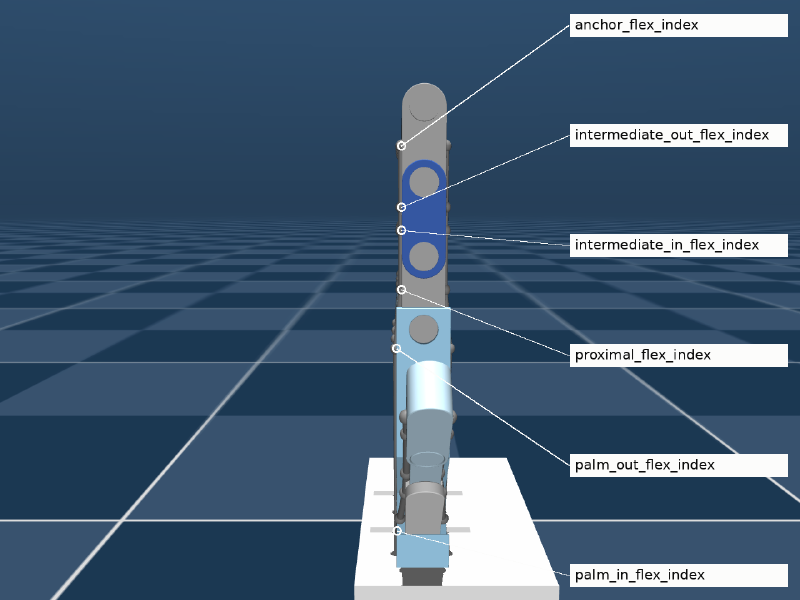
The index finger’s single flexor tendon threaded through six labelled sites from palm to fingertip
One string, six via-points, three joints. Pull it and all three knuckles move together.

So the vision layer must compress three human measurements into one robot command.

Why the mean and not one joint
#

Use only the base (MCP) knuckle and two poses break apart:

  • Right angle — bent at the base, fingers straight: MCP ≈ 90°, the twin closes. ✔
  • Claw — base straight, tips curled: MCP ≈ 180°, the twin stays flat while the finger is visibly curled. ✘

With the mean of all three, using the finger window 3.10 → 1.60 rad from Part 7:

Human pose MCP PIP DIP Mean \(\bar\theta\) Flexion
Open hand 3.10 3.10 3.10 3.10 0.00
Claw (tips only) 3.10 2.20 2.20 2.50 0.40
Right angle (base only) 1.60 3.10 3.10 2.60 0.33
Full fist 1.60 1.60 1.60 1.60 1.00

Any curl anywhere on the finger lowers the mean, so the twin responds to every way a person closes a finger — and a tight fist gives the strongest pull.

What the mean throws away
#

Averaging is lossy on purpose:

  • Pose shape. “Claw” and “right angle” land close together. With one tendon the robot couldn’t reproduce the difference anyway, so nothing that matters is lost.
  • Weighting is a choice. In a human grasp the MCP does most of the closing; a weighted mean such as \(0.5\,\theta_\text{MCP} + 0.3\,\theta_\text{PIP} + 0.2\,\theta_\text{DIP}\) is a valid refinement, but the weights would need tuning against the robot’s real joint coupling.
  • How the robot splits the pull isn’t decided here. That depends on moment arms and joint dynamics. In this model it comes out almost identical across the three index joints — Part 11.
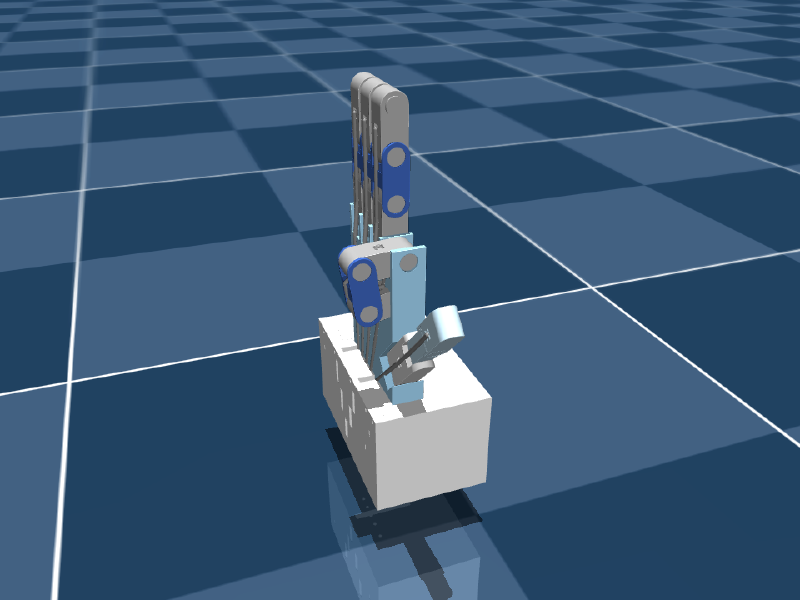
Only the index tendon pulled: all three index joints curl together
One tendon, one command: the whole index finger curls as a unit.

With more tendons
#

A future hardware revision with two tendons per finger — one for MCP, one shared by PIP and DIP — makes the compression 3 → 2: average PIP and DIP (which are anatomically coupled in humans too) and send MCP on its own. The flexion topic just grows from five numbers to ten.

Mulham Fetna
Author
Mulham Fetna
Renaissance Engineer
ROS 2 Tendon-Driven Hand MuJoCo Twin - This article is part of a series.
Part 6: This Article

Related

From an Onshape assembly to a MuJoCo model with onshape-to-robot

The simulated hand was never modelled by hand. It is an Onshape assembly — five SG90 servos, fifteen knuckle mates, a palm full of tendon channels — pulled through the Onshape API and written out as MuJoCo XML. Here is the design, and every setting that steers the export. Open the Onshape assembly The design # Your browser cannot play this video. Download video. Palm and fingers: four three-phalanx fingers and a three-segment thumb, every knuckle a revolute mate with limits. The RGB triads in the views are mate connectors. Tendon channels: one per finger, running down the palm into the base. Servo block: five SG90-class servos, staggered so each horn sits under a tendon exit. The design has a history # Start 2026-09-02 The first version in the history. v1.0.0 — MediaPipe 2026-09-06 The joint-angle-driven hand behind the RViz predecessor project. v1.0.1 → Main 2026-09-08 Point release and the main line the later work branches from. V3 → Mujoco branch 2026-09-16 The current design used by this twin — the version with the servo base block shown above. Onshape version history Mate features 43 part instances, 112 mate features: the 15 dof_* knuckle mates, the servo mates, and many Fastened mates.

How a webcam moves a simulated tendon-driven hand

One vision container turns webcam frames into five numbers. One simulation container turns those numbers into tendon forces. Everything else in this series is detail inside one of those two boxes — or the pipe between them. Left to right, three layers in one frame: vision (landmarks), simulation (the twin), actuation (live motor forces from MuJoCo’s Control panel). End to end # flowchart LR subgraph VISION["🐳 vision_tracker container"] direction TB A["Webcam frame 640×480 BGR"] --> B["MediaPipe Hands 21 landmarks"] B --> C["3 knuckle angles / finger dot product"] C --> D["mean → 1 curl angle (underactuation)"] D --> E["normalize + clip flexion 0..1"] end subgraph TWIN["🐳 mujoco_twin container"] direction TB F["lerp +50 N … −50 N"] --> G["data.ctrl on pull_{finger} motor"] G --> H["spatial tendon through 6 sites"] H --> I["3 passive hinge joints curl"] I --> J["MuJoCo viewer"] end E -- "ROS 2 · /hand/target_flexions sensor_msgs/JointState" --> F Stage What comes out Deep dive MediaPipe Hands 21 (x, y, z) landmarks per frame Part 4 Triplet angles 3 interior angles per finger, in radians Part 5 Averaging 1 curl angle per finger Part 6 Normalization flexion 0..1 (the thumb has its own window) Parts 7–8 ROS 2 topic JointState: names are fingers, positions are flexions Part 15 Lerp force in newtons per tendon Part 10 Tendon physics joint angles Part 11 Why the pipe carries flexions, not angles or forces # The contract between the containers is five unitless numbers: 0.0 is an open finger, 1.0 is a closed one. That choice is the architecture.

The manual MJCF edits that turn a CAD export into a tendon-driven hand

A raw CAD export gives you bodies, joints, meshes and sites — and a hand that does nothing. Four edits and one extra file turn it into a tendon-driven twin. One of those edits, it turns out, does nothing at all — which is worth understanding too. Which edits survive a re-export # flowchart TB subgraph generated["robot.xml — regenerated by onshape-to-robot"] D["① joint defaults manual — re-apply"] T["② tendons + ③ contacts auto-injected from tendons.xml"] B["bodies · joints · sites · meshes generated"] A["④ actuators manual — re-apply"] end S["⑤ scene.xml floor · lights · skybox never regenerated"] -->|"include robot.xml"| generated # Edit Lives in Survives re-export? ① Joint friction / armature / damping defaults robot.xml <default> ✘ re-apply ② Flexor + extensor spatial tendons tendons.xml → injected ✔ ③ Contact exclusions tendons.xml → injected ✔ ④ Five tendon motors robot.xml <actuator> ✘ re-apply ⑤ Environment scene.xml ✔ separate file tendons.xml is kept byte-identical to the <tendon> and <contact> region of robot.xml. Tune a tendon in robot.xml without copying it back and the next export silently reverts it. ① Joint defaults — stability # <default class="ros2-tendon-driven-hand-gazebo-digital-twin"> <joint frictionloss="0.001" armature="0.0001" damping="0.01"/> Attribute Value Role damping 0.01 N·m·s/rad stops a 2 g phalanx reaching absurd speed when 50 N yanks it armature 0.0001 kg·m² rotor-like inertia on each joint’s diagonal — conditions the solver for very light bodies frictionloss 0.001 N·m a small dry-friction dead-band so joints settle instead of creeping Phalanges weigh 1.8–5.4 g. Without these, tiny inertias under large tendon forces blow up the integrator — an earlier, larger revision of the model logged Nan, Inf or huge value in QACC at DOF 128. The simulation is unstable.

Why the thumb needs its own thresholds in hand tracking

Squeeze your thumb across your palm as hard as you can and, by the finger thresholds, it is only half closed. The thumb isn’t a finger with a shorter bone — it’s a different joint. Thumb curled, fingers open. Only pull_thumb goes negative (−19.5 N, flexion 0.69); every other motor pushes open. Hinges versus a saddle # Index to pinky are chains of hinge joints. A fist rolls them into a tight spiral, each knuckle approaching 90°. The thumb hangs from the carpometacarpal (CMC) saddle joint at the wrist. It sweeps across the palm — opposition — instead of simply curling. Much of “closing the thumb” is rotation of the whole thumb, not bending at its knuckles. What MediaPipe measures because of it # Interior angles come from 3D landmark positions, so the sweep only partly shows up as knuckle bend: Open Fully closed Travel Finger — mean of MCP/PIP/DIP ≈ 3.10 rad ≈ 1.60 rad 1.50 rad Thumb — mean of CMC/MCP/IP ≈ 2.90 rad ≈ 2.30 rad 0.60 rad A fully closed thumb stops near 2.30 rad (~132°). Even its open angle sits below a finger’s — a relaxed thumb is never in line with the wrist.

A webcam, some vector geometry, and a hand that moves

Everything in this series in one read: how a $20 webcam ends up driving a 15-DOF CAD model in real time, why every step is deliberately explicit rather than learned, and what broke along the way. You hold your hand up to a laptop camera. On the other half of the screen, a robotic hand — designed in CAD, never manufactured — closes its fingers at the same moment yours do. There is no glove, no marker, no depth sensor. Just an RGB webcam, two small neural networks, about forty lines of vector geometry, and a middleware stack that thinks it is talking to a real robot. All of it is open source under AGPL-3.0 and archived with a DOI: 10.5281/zenodo.22658556. flowchart LR A["📷 Webcam /dev/video0"] --> B["BlazePalm palm detector"] B --> C["Landmark regressor 21 × (x, y, z)"] C --> D["Dot-product geometry 15 interior angles"] D --> E["Normalize → flexion 0.0 straight · 1.0 curled"] E --> F["Lerp onto the URDF's mechanical limits"] F --> G["/joint_states"] G --> H["robot_state_publisher → /tf"] H --> I["🖥️ RViz digital twin"] The rule that shaped the build # There is an easier version of this project. Collect a few thousand frames of a hand next to the corresponding CAD poses, train a network to map one to the other, and let gradient descent work out the relationship.